Selecionar segmento
Estude com questões de diferentes segmentos
Atenção: Isso limpará todos os campos já preenchidos no filtro!
Foram encontradas 1.116 questões
Resolva questões gratuitamente!
Junte-se a mais de 4 milhões de concurseiros!


Ano: 2010
Banca:
FCC
Órgão:
AL-SP
Prova:
FCC - 2010 - AL-SP - Agente Legislativo de Serviços Técnicos e Administrativos - Processamento de Dados |
Q71783
Inglês
Texto associado
Security: UAC Gets Tolerable
Let's talk about User Account Control ? the Windows
Vista security element that was a prominent example for
everything that bothered people about that OS. UAC aimed to
prevent rogue software from tampering with your PC by
endlessly prompting you to approve running applications or
changing settings. The experience was so grating that many
users preferred to turn UAC [PARTICLE] and [VERB] their
chances with Internet attackers. Those who left it active risked
slipping into the habit of incautiously clicking through every
prompt, defeating whatever value the feature might have had.
Whereas Vista's notorious User Account Control gave
users no control over the feature other than to turn it off,
Windows 7's version of UAC lets users choose from two
intermediate notification levels between 'Always notify' and
'Never notify'.
Windows 7 gives you control over UAC, in the form of a
slider containing four security settings. As before, you can
accept the full-blown UAC or elect to disable it. But you can also
tell UAC to notify you only when software changes Windows
settings, not when you're tweaking them yourself. And you can
instruct it not to perform the abrupt screen-dimming effect that
Vista's version uses to grab your attention.
If Microsoft had its druthers, all Windows 7 users [TO
USE] UAC in full-tilt mode: The slider that you use to ratchet
back its severity advises you not to do so if you routinely install
new software or visit unfamiliar sites, and it warns that disabling
the dimming effect is "Not recommended." , Redmond: I
have every intention of recommending the intermediate settings
to most people who ask me for advice, since those settings
retain most of UAC's theoretical value without driving users
bonkers.
(Adapted from
http://www.pcworld.com/article/172602/windows_7_review.html)
Let's talk about User Account Control ? the Windows
Vista security element that was a prominent example for
everything that bothered people about that OS. UAC aimed to
prevent rogue software from tampering with your PC by
endlessly prompting you to approve running applications or
changing settings. The experience was so grating that many
users preferred to turn UAC [PARTICLE] and [VERB] their
chances with Internet attackers. Those who left it active risked
slipping into the habit of incautiously clicking through every
prompt, defeating whatever value the feature might have had.
Whereas Vista's notorious User Account Control gave
users no control over the feature other than to turn it off,
Windows 7's version of UAC lets users choose from two
intermediate notification levels between 'Always notify' and
'Never notify'.
Windows 7 gives you control over UAC, in the form of a
slider containing four security settings. As before, you can
accept the full-blown UAC or elect to disable it. But you can also
tell UAC to notify you only when software changes Windows
settings, not when you're tweaking them yourself. And you can
instruct it not to perform the abrupt screen-dimming effect that
Vista's version uses to grab your attention.
If Microsoft had its druthers, all Windows 7 users [TO
USE] UAC in full-tilt mode: The slider that you use to ratchet
back its severity advises you not to do so if you routinely install
new software or visit unfamiliar sites, and it warns that disabling
the dimming effect is "Not recommended."
, Redmond: Ihave every intention of recommending the intermediate settings
to most people who ask me for advice, since those settings
retain most of UAC's theoretical value without driving users
bonkers.
(Adapted from
http://www.pcworld.com/article/172602/windows_7_review.html)
Segundo o texto,
Ano: 2010
Banca:
FCC
Órgão:
AL-SP
Prova:
FCC - 2010 - AL-SP - Agente Legislativo de Serviços Técnicos e Administrativos - Processamento de Dados |
Q71782
Inglês
Texto associado
Security: UAC Gets Tolerable
Let's talk about User Account Control ? the Windows
Vista security element that was a prominent example for
everything that bothered people about that OS. UAC aimed to
prevent rogue software from tampering with your PC by
endlessly prompting you to approve running applications or
changing settings. The experience was so grating that many
users preferred to turn UAC [PARTICLE] and [VERB] their
chances with Internet attackers. Those who left it active risked
slipping into the habit of incautiously clicking through every
prompt, defeating whatever value the feature might have had.
Whereas Vista's notorious User Account Control gave
users no control over the feature other than to turn it off,
Windows 7's version of UAC lets users choose from two
intermediate notification levels between 'Always notify' and
'Never notify'.
Windows 7 gives you control over UAC, in the form of a
slider containing four security settings. As before, you can
accept the full-blown UAC or elect to disable it. But you can also
tell UAC to notify you only when software changes Windows
settings, not when you're tweaking them yourself. And you can
instruct it not to perform the abrupt screen-dimming effect that
Vista's version uses to grab your attention.
If Microsoft had its druthers, all Windows 7 users [TO
USE] UAC in full-tilt mode: The slider that you use to ratchet
back its severity advises you not to do so if you routinely install
new software or visit unfamiliar sites, and it warns that disabling
the dimming effect is "Not recommended." , Redmond: I
have every intention of recommending the intermediate settings
to most people who ask me for advice, since those settings
retain most of UAC's theoretical value without driving users
bonkers.
(Adapted from
http://www.pcworld.com/article/172602/windows_7_review.html)
Let's talk about User Account Control ? the Windows
Vista security element that was a prominent example for
everything that bothered people about that OS. UAC aimed to
prevent rogue software from tampering with your PC by
endlessly prompting you to approve running applications or
changing settings. The experience was so grating that many
users preferred to turn UAC [PARTICLE] and [VERB] their
chances with Internet attackers. Those who left it active risked
slipping into the habit of incautiously clicking through every
prompt, defeating whatever value the feature might have had.
Whereas Vista's notorious User Account Control gave
users no control over the feature other than to turn it off,
Windows 7's version of UAC lets users choose from two
intermediate notification levels between 'Always notify' and
'Never notify'.
Windows 7 gives you control over UAC, in the form of a
slider containing four security settings. As before, you can
accept the full-blown UAC or elect to disable it. But you can also
tell UAC to notify you only when software changes Windows
settings, not when you're tweaking them yourself. And you can
instruct it not to perform the abrupt screen-dimming effect that
Vista's version uses to grab your attention.
If Microsoft had its druthers, all Windows 7 users [TO
USE] UAC in full-tilt mode: The slider that you use to ratchet
back its severity advises you not to do so if you routinely install
new software or visit unfamiliar sites, and it warns that disabling
the dimming effect is "Not recommended."
, Redmond: Ihave every intention of recommending the intermediate settings
to most people who ask me for advice, since those settings
retain most of UAC's theoretical value without driving users
bonkers.
(Adapted from
http://www.pcworld.com/article/172602/windows_7_review.html)
Qual a alternativa que melhor preenche a lacuna  ?
?
?
Ano: 2010
Banca:
FCC
Órgão:
AL-SP
Prova:
FCC - 2010 - AL-SP - Agente Legislativo de Serviços Técnicos e Administrativos - Processamento de Dados |
Q71781
Inglês
Texto associado
Security: UAC Gets Tolerable
Let's talk about User Account Control ? the Windows
Vista security element that was a prominent example for
everything that bothered people about that OS. UAC aimed to
prevent rogue software from tampering with your PC by
endlessly prompting you to approve running applications or
changing settings. The experience was so grating that many
users preferred to turn UAC [PARTICLE] and [VERB] their
chances with Internet attackers. Those who left it active risked
slipping into the habit of incautiously clicking through every
prompt, defeating whatever value the feature might have had.
Whereas Vista's notorious User Account Control gave
users no control over the feature other than to turn it off,
Windows 7's version of UAC lets users choose from two
intermediate notification levels between 'Always notify' and
'Never notify'.
Windows 7 gives you control over UAC, in the form of a
slider containing four security settings. As before, you can
accept the full-blown UAC or elect to disable it. But you can also
tell UAC to notify you only when software changes Windows
settings, not when you're tweaking them yourself. And you can
instruct it not to perform the abrupt screen-dimming effect that
Vista's version uses to grab your attention.
If Microsoft had its druthers, all Windows 7 users [TO
USE] UAC in full-tilt mode: The slider that you use to ratchet
back its severity advises you not to do so if you routinely install
new software or visit unfamiliar sites, and it warns that disabling
the dimming effect is "Not recommended." , Redmond: I
have every intention of recommending the intermediate settings
to most people who ask me for advice, since those settings
retain most of UAC's theoretical value without driving users
bonkers.
(Adapted from
http://www.pcworld.com/article/172602/windows_7_review.html)
Let's talk about User Account Control ? the Windows
Vista security element that was a prominent example for
everything that bothered people about that OS. UAC aimed to
prevent rogue software from tampering with your PC by
endlessly prompting you to approve running applications or
changing settings. The experience was so grating that many
users preferred to turn UAC [PARTICLE] and [VERB] their
chances with Internet attackers. Those who left it active risked
slipping into the habit of incautiously clicking through every
prompt, defeating whatever value the feature might have had.
Whereas Vista's notorious User Account Control gave
users no control over the feature other than to turn it off,
Windows 7's version of UAC lets users choose from two
intermediate notification levels between 'Always notify' and
'Never notify'.
Windows 7 gives you control over UAC, in the form of a
slider containing four security settings. As before, you can
accept the full-blown UAC or elect to disable it. But you can also
tell UAC to notify you only when software changes Windows
settings, not when you're tweaking them yourself. And you can
instruct it not to perform the abrupt screen-dimming effect that
Vista's version uses to grab your attention.
If Microsoft had its druthers, all Windows 7 users [TO
USE] UAC in full-tilt mode: The slider that you use to ratchet
back its severity advises you not to do so if you routinely install
new software or visit unfamiliar sites, and it warns that disabling
the dimming effect is "Not recommended."
, Redmond: Ihave every intention of recommending the intermediate settings
to most people who ask me for advice, since those settings
retain most of UAC's theoretical value without driving users
bonkers.
(Adapted from
http://www.pcworld.com/article/172602/windows_7_review.html)
A forma correta de [TO USE] no texto é
Ano: 2010
Banca:
FCC
Órgão:
AL-SP
Prova:
FCC - 2010 - AL-SP - Agente Legislativo de Serviços Técnicos e Administrativos - Processamento de Dados |
Q71780
Inglês
Texto associado
Security: UAC Gets Tolerable
Let's talk about User Account Control ? the Windows
Vista security element that was a prominent example for
everything that bothered people about that OS. UAC aimed to
prevent rogue software from tampering with your PC by
endlessly prompting you to approve running applications or
changing settings. The experience was so grating that many
users preferred to turn UAC [PARTICLE] and [VERB] their
chances with Internet attackers. Those who left it active risked
slipping into the habit of incautiously clicking through every
prompt, defeating whatever value the feature might have had.
Whereas Vista's notorious User Account Control gave
users no control over the feature other than to turn it off,
Windows 7's version of UAC lets users choose from two
intermediate notification levels between 'Always notify' and
'Never notify'.
Windows 7 gives you control over UAC, in the form of a
slider containing four security settings. As before, you can
accept the full-blown UAC or elect to disable it. But you can also
tell UAC to notify you only when software changes Windows
settings, not when you're tweaking them yourself. And you can
instruct it not to perform the abrupt screen-dimming effect that
Vista's version uses to grab your attention.
If Microsoft had its druthers, all Windows 7 users [TO
USE] UAC in full-tilt mode: The slider that you use to ratchet
back its severity advises you not to do so if you routinely install
new software or visit unfamiliar sites, and it warns that disabling
the dimming effect is "Not recommended." , Redmond: I
have every intention of recommending the intermediate settings
to most people who ask me for advice, since those settings
retain most of UAC's theoretical value without driving users
bonkers.
(Adapted from
http://www.pcworld.com/article/172602/windows_7_review.html)
Let's talk about User Account Control ? the Windows
Vista security element that was a prominent example for
everything that bothered people about that OS. UAC aimed to
prevent rogue software from tampering with your PC by
endlessly prompting you to approve running applications or
changing settings. The experience was so grating that many
users preferred to turn UAC [PARTICLE] and [VERB] their
chances with Internet attackers. Those who left it active risked
slipping into the habit of incautiously clicking through every
prompt, defeating whatever value the feature might have had.
Whereas Vista's notorious User Account Control gave
users no control over the feature other than to turn it off,
Windows 7's version of UAC lets users choose from two
intermediate notification levels between 'Always notify' and
'Never notify'.
Windows 7 gives you control over UAC, in the form of a
slider containing four security settings. As before, you can
accept the full-blown UAC or elect to disable it. But you can also
tell UAC to notify you only when software changes Windows
settings, not when you're tweaking them yourself. And you can
instruct it not to perform the abrupt screen-dimming effect that
Vista's version uses to grab your attention.
If Microsoft had its druthers, all Windows 7 users [TO
USE] UAC in full-tilt mode: The slider that you use to ratchet
back its severity advises you not to do so if you routinely install
new software or visit unfamiliar sites, and it warns that disabling
the dimming effect is "Not recommended."
, Redmond: Ihave every intention of recommending the intermediate settings
to most people who ask me for advice, since those settings
retain most of UAC's theoretical value without driving users
bonkers.
(Adapted from
http://www.pcworld.com/article/172602/windows_7_review.html)
A synonym for Whereas, as it is used in the text, is
Ano: 2010
Banca:
FCC
Órgão:
AL-SP
Prova:
FCC - 2010 - AL-SP - Agente Legislativo de Serviços Técnicos e Administrativos - Processamento de Dados |
Q71779
Inglês
Texto associado
Security: UAC Gets Tolerable
Let's talk about User Account Control ? the Windows
Vista security element that was a prominent example for
everything that bothered people about that OS. UAC aimed to
prevent rogue software from tampering with your PC by
endlessly prompting you to approve running applications or
changing settings. The experience was so grating that many
users preferred to turn UAC [PARTICLE] and [VERB] their
chances with Internet attackers. Those who left it active risked
slipping into the habit of incautiously clicking through every
prompt, defeating whatever value the feature might have had.
Whereas Vista's notorious User Account Control gave
users no control over the feature other than to turn it off,
Windows 7's version of UAC lets users choose from two
intermediate notification levels between 'Always notify' and
'Never notify'.
Windows 7 gives you control over UAC, in the form of a
slider containing four security settings. As before, you can
accept the full-blown UAC or elect to disable it. But you can also
tell UAC to notify you only when software changes Windows
settings, not when you're tweaking them yourself. And you can
instruct it not to perform the abrupt screen-dimming effect that
Vista's version uses to grab your attention.
If Microsoft had its druthers, all Windows 7 users [TO
USE] UAC in full-tilt mode: The slider that you use to ratchet
back its severity advises you not to do so if you routinely install
new software or visit unfamiliar sites, and it warns that disabling
the dimming effect is "Not recommended." , Redmond: I
have every intention of recommending the intermediate settings
to most people who ask me for advice, since those settings
retain most of UAC's theoretical value without driving users
bonkers.
(Adapted from
http://www.pcworld.com/article/172602/windows_7_review.html)
Let's talk about User Account Control ? the Windows
Vista security element that was a prominent example for
everything that bothered people about that OS. UAC aimed to
prevent rogue software from tampering with your PC by
endlessly prompting you to approve running applications or
changing settings. The experience was so grating that many
users preferred to turn UAC [PARTICLE] and [VERB] their
chances with Internet attackers. Those who left it active risked
slipping into the habit of incautiously clicking through every
prompt, defeating whatever value the feature might have had.
Whereas Vista's notorious User Account Control gave
users no control over the feature other than to turn it off,
Windows 7's version of UAC lets users choose from two
intermediate notification levels between 'Always notify' and
'Never notify'.
Windows 7 gives you control over UAC, in the form of a
slider containing four security settings. As before, you can
accept the full-blown UAC or elect to disable it. But you can also
tell UAC to notify you only when software changes Windows
settings, not when you're tweaking them yourself. And you can
instruct it not to perform the abrupt screen-dimming effect that
Vista's version uses to grab your attention.
If Microsoft had its druthers, all Windows 7 users [TO
USE] UAC in full-tilt mode: The slider that you use to ratchet
back its severity advises you not to do so if you routinely install
new software or visit unfamiliar sites, and it warns that disabling
the dimming effect is "Not recommended."
, Redmond: Ihave every intention of recommending the intermediate settings
to most people who ask me for advice, since those settings
retain most of UAC's theoretical value without driving users
bonkers.
(Adapted from
http://www.pcworld.com/article/172602/windows_7_review.html)
A alternativa que substitui corretamente a lacuna [VERB] é
Ano: 2010
Banca:
FCC
Órgão:
AL-SP
Prova:
FCC - 2010 - AL-SP - Agente Legislativo de Serviços Técnicos e Administrativos - Processamento de Dados |
Q71778
Inglês
Texto associado
Security: UAC Gets Tolerable
Let's talk about User Account Control ? the Windows
Vista security element that was a prominent example for
everything that bothered people about that OS. UAC aimed to
prevent rogue software from tampering with your PC by
endlessly prompting you to approve running applications or
changing settings. The experience was so grating that many
users preferred to turn UAC [PARTICLE] and [VERB] their
chances with Internet attackers. Those who left it active risked
slipping into the habit of incautiously clicking through every
prompt, defeating whatever value the feature might have had.
Whereas Vista's notorious User Account Control gave
users no control over the feature other than to turn it off,
Windows 7's version of UAC lets users choose from two
intermediate notification levels between 'Always notify' and
'Never notify'.
Windows 7 gives you control over UAC, in the form of a
slider containing four security settings. As before, you can
accept the full-blown UAC or elect to disable it. But you can also
tell UAC to notify you only when software changes Windows
settings, not when you're tweaking them yourself. And you can
instruct it not to perform the abrupt screen-dimming effect that
Vista's version uses to grab your attention.
If Microsoft had its druthers, all Windows 7 users [TO
USE] UAC in full-tilt mode: The slider that you use to ratchet
back its severity advises you not to do so if you routinely install
new software or visit unfamiliar sites, and it warns that disabling
the dimming effect is "Not recommended." , Redmond: I
have every intention of recommending the intermediate settings
to most people who ask me for advice, since those settings
retain most of UAC's theoretical value without driving users
bonkers.
(Adapted from
http://www.pcworld.com/article/172602/windows_7_review.html)
Let's talk about User Account Control ? the Windows
Vista security element that was a prominent example for
everything that bothered people about that OS. UAC aimed to
prevent rogue software from tampering with your PC by
endlessly prompting you to approve running applications or
changing settings. The experience was so grating that many
users preferred to turn UAC [PARTICLE] and [VERB] their
chances with Internet attackers. Those who left it active risked
slipping into the habit of incautiously clicking through every
prompt, defeating whatever value the feature might have had.
Whereas Vista's notorious User Account Control gave
users no control over the feature other than to turn it off,
Windows 7's version of UAC lets users choose from two
intermediate notification levels between 'Always notify' and
'Never notify'.
Windows 7 gives you control over UAC, in the form of a
slider containing four security settings. As before, you can
accept the full-blown UAC or elect to disable it. But you can also
tell UAC to notify you only when software changes Windows
settings, not when you're tweaking them yourself. And you can
instruct it not to perform the abrupt screen-dimming effect that
Vista's version uses to grab your attention.
If Microsoft had its druthers, all Windows 7 users [TO
USE] UAC in full-tilt mode: The slider that you use to ratchet
back its severity advises you not to do so if you routinely install
new software or visit unfamiliar sites, and it warns that disabling
the dimming effect is "Not recommended."
, Redmond: Ihave every intention of recommending the intermediate settings
to most people who ask me for advice, since those settings
retain most of UAC's theoretical value without driving users
bonkers.
(Adapted from
http://www.pcworld.com/article/172602/windows_7_review.html)
A palavra que substitui corretamente a lacuna [PARTICLE] é
Ano: 2010
Banca:
FCC
Órgão:
AL-SP
Prova:
FCC - 2010 - AL-SP - Agente Legislativo de Serviços Técnicos e Administrativos - Processamento de Dados |
Q71777
Inglês
Texto associado
Security: UAC Gets Tolerable
Let's talk about User Account Control ? the Windows
Vista security element that was a prominent example for
everything that bothered people about that OS. UAC aimed to
prevent rogue software from tampering with your PC by
endlessly prompting you to approve running applications or
changing settings. The experience was so grating that many
users preferred to turn UAC [PARTICLE] and [VERB] their
chances with Internet attackers. Those who left it active risked
slipping into the habit of incautiously clicking through every
prompt, defeating whatever value the feature might have had.
Whereas Vista's notorious User Account Control gave
users no control over the feature other than to turn it off,
Windows 7's version of UAC lets users choose from two
intermediate notification levels between 'Always notify' and
'Never notify'.
Windows 7 gives you control over UAC, in the form of a
slider containing four security settings. As before, you can
accept the full-blown UAC or elect to disable it. But you can also
tell UAC to notify you only when software changes Windows
settings, not when you're tweaking them yourself. And you can
instruct it not to perform the abrupt screen-dimming effect that
Vista's version uses to grab your attention.
If Microsoft had its druthers, all Windows 7 users [TO
USE] UAC in full-tilt mode: The slider that you use to ratchet
back its severity advises you not to do so if you routinely install
new software or visit unfamiliar sites, and it warns that disabling
the dimming effect is "Not recommended." , Redmond: I
have every intention of recommending the intermediate settings
to most people who ask me for advice, since those settings
retain most of UAC's theoretical value without driving users
bonkers.
(Adapted from
http://www.pcworld.com/article/172602/windows_7_review.html)
Let's talk about User Account Control ? the Windows
Vista security element that was a prominent example for
everything that bothered people about that OS. UAC aimed to
prevent rogue software from tampering with your PC by
endlessly prompting you to approve running applications or
changing settings. The experience was so grating that many
users preferred to turn UAC [PARTICLE] and [VERB] their
chances with Internet attackers. Those who left it active risked
slipping into the habit of incautiously clicking through every
prompt, defeating whatever value the feature might have had.
Whereas Vista's notorious User Account Control gave
users no control over the feature other than to turn it off,
Windows 7's version of UAC lets users choose from two
intermediate notification levels between 'Always notify' and
'Never notify'.
Windows 7 gives you control over UAC, in the form of a
slider containing four security settings. As before, you can
accept the full-blown UAC or elect to disable it. But you can also
tell UAC to notify you only when software changes Windows
settings, not when you're tweaking them yourself. And you can
instruct it not to perform the abrupt screen-dimming effect that
Vista's version uses to grab your attention.
If Microsoft had its druthers, all Windows 7 users [TO
USE] UAC in full-tilt mode: The slider that you use to ratchet
back its severity advises you not to do so if you routinely install
new software or visit unfamiliar sites, and it warns that disabling
the dimming effect is "Not recommended."
, Redmond: Ihave every intention of recommending the intermediate settings
to most people who ask me for advice, since those settings
retain most of UAC's theoretical value without driving users
bonkers.
(Adapted from
http://www.pcworld.com/article/172602/windows_7_review.html)
A synonym for grating, as it is used in the text, is
Ano: 2010
Banca:
FCC
Órgão:
AL-SP
Prova:
FCC - 2010 - AL-SP - Agente Legislativo de Serviços Técnicos e Administrativos - Processamento de Dados |
Q71775
Direito Constitucional
Compete privativamente à União legislar sobre
Ano: 2010
Banca:
FCC
Órgão:
AL-SP
Prova:
FCC - 2010 - AL-SP - Agente Legislativo de Serviços Técnicos e Administrativos - Processamento de Dados |
Q71774
Direito Constitucional
Sobre os Direitos e Garantias Individuais e Coletivos, considere:
I. O Partido Político, com ou sem representação no Congresso Nacional, está legitimado à propositura de Mandado de Segurança Coletivo.
II. O brasileiro naturalizado poderá ser extraditado em caso de crime comum, praticado antes da naturalização, ou de comprovado envolvimento em tráfico ilícito de entorpecentes e drogas afins, na forma da lei.
III. Conceder-se-á mandado de injunção sempre que a falta de norma regulamentadora torne inviável o exercício dos direitos e liberdades constitucionais e das prerrogativas inerentes à nacionalidade, à soberania e à cidadania.
IV. As associações só poderão ser compulsoriamente dissolvidas ou ter suas atividades suspensas por decisão judicial, exigindo-se, em ambos os casos, o trânsito em julgado.
De acordo com a Constituição Federal de 1988, está correto o que se afirma APENAS em
I. O Partido Político, com ou sem representação no Congresso Nacional, está legitimado à propositura de Mandado de Segurança Coletivo.
II. O brasileiro naturalizado poderá ser extraditado em caso de crime comum, praticado antes da naturalização, ou de comprovado envolvimento em tráfico ilícito de entorpecentes e drogas afins, na forma da lei.
III. Conceder-se-á mandado de injunção sempre que a falta de norma regulamentadora torne inviável o exercício dos direitos e liberdades constitucionais e das prerrogativas inerentes à nacionalidade, à soberania e à cidadania.
IV. As associações só poderão ser compulsoriamente dissolvidas ou ter suas atividades suspensas por decisão judicial, exigindo-se, em ambos os casos, o trânsito em julgado.
De acordo com a Constituição Federal de 1988, está correto o que se afirma APENAS em
Ano: 2010
Banca:
FCC
Órgão:
AL-SP
Prova:
FCC - 2010 - AL-SP - Agente Legislativo de Serviços Técnicos e Administrativos - Processamento de Dados |
Q71773
Raciocínio Lógico
Três Agentes Administrativos da Assembleia Legislativa de São Paulo ? Artur, Bento e Cinira ? foram incumbidos de arquivar um lote de documentos e, antes da execução dessa tarefa, fizeram as seguintes afirmações sobre a quantidade de documentos que ele continha:
Artur: O número de documentos do lote é maior que 50 e menor que 75.
Bento: O número de documentos do lote é maior que 60 e menor que 80.
Cinira: O número de documentos do lote é maior que 70 e menor que 100.
Considerando que as três afirmações estão corretas, a soma das possíveis quantidades de documentos que esse lote pode conter é um número compreendido entre
Artur: O número de documentos do lote é maior que 50 e menor que 75.
Bento: O número de documentos do lote é maior que 60 e menor que 80.
Cinira: O número de documentos do lote é maior que 70 e menor que 100.
Considerando que as três afirmações estão corretas, a soma das possíveis quantidades de documentos que esse lote pode conter é um número compreendido entre
Ano: 2010
Banca:
FCC
Órgão:
AL-SP
Prova:
FCC - 2010 - AL-SP - Agente Legislativo de Serviços Técnicos e Administrativos - Processamento de Dados |
Q71772
Raciocínio Lógico
Paloma fez as seguintes declarações:
- "Sou inteligente e não trabalho."
- "Se não tiro férias, então trabalho."
Supondo que as duas declarações sejam verdadeiras, é FALSO concluir que Paloma
Ano: 2010
Banca:
FCC
Órgão:
AL-SP
Prova:
FCC - 2010 - AL-SP - Agente Legislativo de Serviços Técnicos e Administrativos - Processamento de Dados |
Q71771
Raciocínio Lógico
Do total de Agentes que trabalham em certo setor da Assembleia Legislativa de São Paulo, sabe-se que, se fossem excluídos os
- do sexo feminino, restariam 15 Agentes;
- do sexo masculino, restariam 12 Agentes;
- que usam óculos, restariam 16 Agentes;
- que são do sexo feminino ou usam óculos, restariam 9 Agentes.
Com base nessas informações, o número de Agentes desse setor que são do sexo masculino e não usam óculos é
Ano: 2010
Banca:
FCC
Órgão:
AL-SP
Prova:
FCC - 2010 - AL-SP - Agente Legislativo de Serviços Técnicos e Administrativos - Processamento de Dados |
Q71770
Matemática
A sequência de números inteiros (F1, F2, F3...Fn-1, Fn , Fn+1...) cujos os termos são obtidos utilizando a lei de formação F1= F2= 1 e Fn = Fn-1 + Fn -2, para todo inteiro n ≥ 3, é chamada Sequência de Fibonacci - famoso matemático italiano do século XIII. Assim sendo, a soma do quinto, sétimo e décimo termos da Sequência de Fibonacci é igual a
Ano: 2010
Banca:
FCC
Órgão:
AL-SP
Prova:
FCC - 2010 - AL-SP - Agente Legislativo de Serviços Técnicos e Administrativos - Processamento de Dados |
Q71769
Matemática
Segundo o registro da entrada e saída de pessoas, X pessoas visitaram as dependências da Assembleia Legislativa de São Paulo, ao longo de certa semana, de segunda à sexta-feira. Relativamente ao registro dessas pessoas, sabe-se que:
? mais de 710 lá estiveram ao longo dessa semana;
? o número de homens era menor que 500 e igual a de X.
de X.
Nessas condições, o total de mulheres que visitaram a Assembleia nessa semana é um número
? mais de 710 lá estiveram ao longo dessa semana;
? o número de homens era menor que 500 e igual a
de X. Nessas condições, o total de mulheres que visitaram a Assembleia nessa semana é um número
Ano: 2010
Banca:
FCC
Órgão:
AL-SP
Prova:
FCC - 2010 - AL-SP - Agente Técnico Legislativo Especializado - Engenharia Elétrica |
Q71451
Engenharia Elétrica

Considerando que o eletroduto X possui apenas os condutores indicados no diagrama unifilar, ele deve ter diâmetro mínimo de
Ano: 2010
Banca:
FCC
Órgão:
AL-SP
Prova:
FCC - 2010 - AL-SP - Agente Técnico Legislativo Especializado - Engenharia Elétrica |
Q71450
Engenharia Elétrica
Um gerador trifásico em estrela balanceado de 220 V de linha operando em sequência positiva de fases alimenta uma carga estrela, 4 fios, equilibrada, formada por impedâncias de 10?45° [?]. A potência ativa total na carga vale, aproximadamente, em kW,
Ano: 2010
Banca:
FCC
Órgão:
AL-SP
Prova:
FCC - 2010 - AL-SP - Agente Técnico Legislativo Especializado - Engenharia Elétrica |
Q71449
Engenharia Elétrica
Dois sinais senoidais de mesma frequência são aplicados em um osciloscópio de duplo canal, sendo um no canal 1 e outro na entrada externa do controle de base tempo, obtendo-se a figura de Lissajous abaixo.
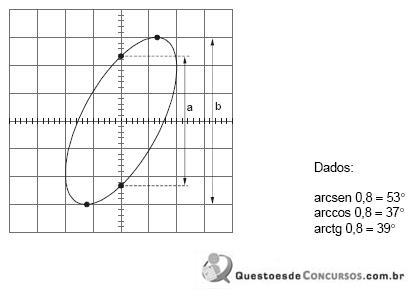
A defasagem entre os sinais, em radianos, vale, aproximadamente,
A defasagem entre os sinais, em radianos, vale, aproximadamente,
Ano: 2010
Banca:
FCC
Órgão:
AL-SP
Prova:
FCC - 2010 - AL-SP - Agente Técnico Legislativo Especializado - Engenharia Elétrica |
Q71448
Engenharia Elétrica
Um gerador com tensão 100∠30º[V] alimenta um circuito série formado por uma reatância indutiva de 100Ω , uma reatância capacitiva de 300Ω e uma resistência de 200 Ω . A corrente do circuito na forma polar vale
Ano: 2010
Banca:
FCC
Órgão:
AL-SP
Prova:
FCC - 2010 - AL-SP - Agente Técnico Legislativo Especializado - Engenharia Elétrica |
Q71447
Engenharia Elétrica
Uma instalação elétrica de 220 V alimenta uma carga indutiva que consome 10 kW com fator de potência 0,5. Para tornar o fator de potência unitário é necessário conectar um capacitor tal que sua potência reativa seja de, aproximadamente, em kVAr,
Ano: 2010
Banca:
FCC
Órgão:
AL-SP
Prova:
FCC - 2010 - AL-SP - Agente Técnico Legislativo Especializado - Engenharia Elétrica |
Q71446
Engenharia Elétrica
Considere o dispositivo abaixo e algumas de suas especificações:
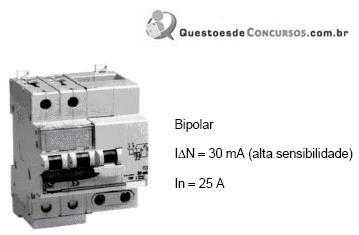
Trata-se de um
Trata-se de um

 Conheça nossos planos