Questões de Concurso
Sobre verbos | verbs em inglês
Foram encontradas 3.096 questões


Ano: 2012
Banca:
Makiyama
Órgão:
CPTM
Provas:
Makiyama - 2012 - CPTM - Analista Administrativo Júnior
|
Makiyama - 2012 - CPTM - Analista de Recursos Humanos Júnior - Administração de Empresas |
Makiyama - 2012 - CPTM - Advogado Júnior |
Makiyama - 2012 - CPTM - Auditor Júnior |
Q328060
Inglês
Texto associado
Generation Y
By Sally Kane, About.com Guide
Born in the mid-1980's and later, Generation Y legal professionals are in their 20s and are just entering the workforce. With numbers estimated as high as 70 million, Generation Y (also -1- as the Millennials) is the fastest growing segment of today's workforce. As law firms compete for available talent, employers cannot ignore the needs, desires and attitudes of this vast generation. Below are a few common traits that define Generation Y.
Tech-Savvy: Generation Y grew up with technology and rely on it to perform their jobs better. Armed with BlackBerrys, laptops, cellphones and other gadgets, Generation Y is plugged-in 24 hours a day, 7 days a week. This generation prefers to communicate through e-mail and text messaging rather than face-to-face contact and -2- webinars and online technology to traditional lecture-based presentations.
Family-Centric: The fast-track has lost much of its appeal for Generation Y who is willing to trade high pay for fewer billable hours, flexible schedules and a better work/life balance. While older generations may view this attitude as narcissistic or lacking commitment, discipline and drive, Generation Y legal professionals have a different vision of workplace expectations and prioritize family over work.
Achievement-Oriented: Nurtured and pampered -3- parents who did not want to make the mistakes of the previous generation, Generation Y is confident, ambitious and achievement-oriented. They have high expectations of their employers, seek out new challenges and are not afraid to question authority. Generation Y wants meaningful work and a solid learning curve
Team-Oriented: As children, Generation Y participated in team sports, play groups and other group activities. They value teamwork and seek the input and affirmation of others. Part of a no-person-left-behind generation, Generation Y is loyal, committed and wants to be included and involved.
Attention-Craving: Generation Y craves attention in the forms of feedback and guidance. They appreciate being kept in the loop and seek frequent praise and reassurance. Generation Y may benefit greatly from mentors who can help guide and develop their young careers.
Font: http://legalcareers.about.com/od/practicetips/a/Ge...
By Sally Kane, About.com Guide
Born in the mid-1980's and later, Generation Y legal professionals are in their 20s and are just entering the workforce. With numbers estimated as high as 70 million, Generation Y (also -1- as the Millennials) is the fastest growing segment of today's workforce. As law firms compete for available talent, employers cannot ignore the needs, desires and attitudes of this vast generation. Below are a few common traits that define Generation Y.
Tech-Savvy: Generation Y grew up with technology and rely on it to perform their jobs better. Armed with BlackBerrys, laptops, cellphones and other gadgets, Generation Y is plugged-in 24 hours a day, 7 days a week. This generation prefers to communicate through e-mail and text messaging rather than face-to-face contact and -2- webinars and online technology to traditional lecture-based presentations.
Family-Centric: The fast-track has lost much of its appeal for Generation Y who is willing to trade high pay for fewer billable hours, flexible schedules and a better work/life balance. While older generations may view this attitude as narcissistic or lacking commitment, discipline and drive, Generation Y legal professionals have a different vision of workplace expectations and prioritize family over work.
Achievement-Oriented: Nurtured and pampered -3- parents who did not want to make the mistakes of the previous generation, Generation Y is confident, ambitious and achievement-oriented. They have high expectations of their employers, seek out new challenges and are not afraid to question authority. Generation Y wants meaningful work and a solid learning curve
Team-Oriented: As children, Generation Y participated in team sports, play groups and other group activities. They value teamwork and seek the input and affirmation of others. Part of a no-person-left-behind generation, Generation Y is loyal, committed and wants to be included and involved.
Attention-Craving: Generation Y craves attention in the forms of feedback and guidance. They appreciate being kept in the loop and seek frequent praise and reassurance. Generation Y may benefit greatly from mentors who can help guide and develop their young careers.
Font: http://legalcareers.about.com/od/practicetips/a/Ge...
The word that best complete the gap 2 is:
Ano: 2012
Banca:
EXATUS
Órgão:
DETRAN-RJ
Prova:
EXATUS - 2012 - DETRAN-RJ - Todos os Cargos - Conhecimentos Gerais |
Q317100
Inglês
Choose the alternative that shows the correct form to use the Conditional:
Andrew is able to understand his France teacher, therefore he _____ answer his questions.
Andrew is able to understand his France teacher, therefore he _____ answer his questions.
Ano: 2012
Banca:
EXATUS
Órgão:
DETRAN-RJ
Prova:
EXATUS - 2012 - DETRAN-RJ - Todos os Cargos - Conhecimentos Gerais |
Q317099
Inglês
Escolha a alternativa que completa corretamente a sentença:
The Smiths have had __________twice last year.
The Smiths have had __________twice last year.
Ano: 2012
Banca:
IBFC
Órgão:
INEP
Prova:
IBFC - 2012 - INEP - Pesquisador-Tecnologista em Informações e Avaliações Educacionais - Área III |
Q297299
Inglês
Choose the best alternative, according to the following situation described:
Situation: I left my bicycle here and now it's gone.
Situation: I left my bicycle here and now it's gone.
Ano: 2012
Banca:
IBFC
Órgão:
INEP
Prova:
IBFC - 2012 - INEP - Pesquisador-Tecnologista em Informações e Avaliações Educacionais - Área III |
Q297297
Inglês
Read the following sentences I, II, III: I.
I sent a letter to the airline company complaining about the problems I had during the flight and they have promised to look into the matter.
II. Although that doctor hasn't won the Nobel Prize, I look up to him.
III. I promised her that I would look after her kids if she weren't able to do that.
It's correct to say that the meaning of each underline bold phrasal verb is respectively
I sent a letter to the airline company complaining about the problems I had during the flight and they have promised to look into the matter.
II. Although that doctor hasn't won the Nobel Prize, I look up to him.
III. I promised her that I would look after her kids if she weren't able to do that.
It's correct to say that the meaning of each underline bold phrasal verb is respectively
Ano: 2012
Banca:
IBFC
Órgão:
INEP
Prova:
IBFC - 2012 - INEP - Pesquisador-Tecnologista em Informações e Avaliações Educacionais - Área III |
Q297295
Inglês
Texto associado
Read the text and answer questions 19), 20), 21), 22), 23) and 24).
Lawsuits claim Knoedler made huge profits on fakes
For more than a dozen years the Upper East Side gallery Knoedler & Company was “substantially dependent” on profits it made from selling a mysterious collection of artwork that is at the center of a federal forgery investigation, former clients of this former gallery have charged in court papers. The analysis is based on financial records turned over as part of a lawsuit against the gallery filed by Domenico and Eleanore De Sole, who in 2004 paid $8.3 million for a painting attributed to Mark Rothko that they now say is a worthless fake. The Rothko is one of approximately 40 works that Knoedler, which closed last year, obtained from Glafira Rosales, a littleknown dealer whose collection of works attributed to Modernist masters has no documented provenance and is the subject of an F.B.I. investigation. Between 1996 and 2008, the suit asserts, Knoedler earned approximately $60 million from works that Ms. Rosales provided on consignment or sold outright to the gallery and cleared $40 million in profits. In one year, 2002, for example, the complaint says the gallery’s entire profit — $5.6 million — was derived from the sale of Ms. Rosales’s works. “Knoedler’s viability as a business was substantially — and, in some years, almost entirely — dependent on sales from the Rosales Collection,” the De Soles claimed last month in an amended version of the suit they filed this year. While the forgery allegations are well known and have been the subject of three federal lawsuits against Knoedler, the recent filings expand the known number of Rosales artworks that were handled by the gallery, which was in business for 165 years, and assert that they played a pivotal role in the gallery’s success. After the F.B.I. issued subpoenas to the gallery in the fall of 2009, Michael Hammer, Knoedler’s owner, halted the sale of any Rosales works. Knoedler ended up losing money that year and in 2010, the court papers say. http://www.nytimes.com/2012/10/22/arts/design/knoe...
Lawsuits claim Knoedler made huge profits on fakes
For more than a dozen years the Upper East Side gallery Knoedler & Company was “substantially dependent” on profits it made from selling a mysterious collection of artwork that is at the center of a federal forgery investigation, former clients of this former gallery have charged in court papers. The analysis is based on financial records turned over as part of a lawsuit against the gallery filed by Domenico and Eleanore De Sole, who in 2004 paid $8.3 million for a painting attributed to Mark Rothko that they now say is a worthless fake. The Rothko is one of approximately 40 works that Knoedler, which closed last year, obtained from Glafira Rosales, a littleknown dealer whose collection of works attributed to Modernist masters has no documented provenance and is the subject of an F.B.I. investigation. Between 1996 and 2008, the suit asserts, Knoedler earned approximately $60 million from works that Ms. Rosales provided on consignment or sold outright to the gallery and cleared $40 million in profits. In one year, 2002, for example, the complaint says the gallery’s entire profit — $5.6 million — was derived from the sale of Ms. Rosales’s works. “Knoedler’s viability as a business was substantially — and, in some years, almost entirely — dependent on sales from the Rosales Collection,” the De Soles claimed last month in an amended version of the suit they filed this year. While the forgery allegations are well known and have been the subject of three federal lawsuits against Knoedler, the recent filings expand the known number of Rosales artworks that were handled by the gallery, which was in business for 165 years, and assert that they played a pivotal role in the gallery’s success. After the F.B.I. issued subpoenas to the gallery in the fall of 2009, Michael Hammer, Knoedler’s owner, halted the sale of any Rosales works. Knoedler ended up losing money that year and in 2010, the court papers say. http://www.nytimes.com/2012/10/22/arts/design/knoe...
In the passage “The analysis is based on financial records turned over as part of a lawsuit against the gallery filed by Domenico and Eleanore De Sole" the meaning of the phrasal verb is
Ano: 2012
Banca:
IBFC
Órgão:
INEP
Prova:
IBFC - 2012 - INEP - Pesquisador-Tecnologista em Informações e Avaliações Educacionais - Área III |
Q297294
Inglês
Texto associado
Read the text and answer questions 19), 20), 21), 22), 23) and 24).
Lawsuits claim Knoedler made huge profits on fakes
For more than a dozen years the Upper East Side gallery Knoedler & Company was “substantially dependent” on profits it made from selling a mysterious collection of artwork that is at the center of a federal forgery investigation, former clients of this former gallery have charged in court papers. The analysis is based on financial records turned over as part of a lawsuit against the gallery filed by Domenico and Eleanore De Sole, who in 2004 paid $8.3 million for a painting attributed to Mark Rothko that they now say is a worthless fake. The Rothko is one of approximately 40 works that Knoedler, which closed last year, obtained from Glafira Rosales, a littleknown dealer whose collection of works attributed to Modernist masters has no documented provenance and is the subject of an F.B.I. investigation. Between 1996 and 2008, the suit asserts, Knoedler earned approximately $60 million from works that Ms. Rosales provided on consignment or sold outright to the gallery and cleared $40 million in profits. In one year, 2002, for example, the complaint says the gallery’s entire profit — $5.6 million — was derived from the sale of Ms. Rosales’s works. “Knoedler’s viability as a business was substantially — and, in some years, almost entirely — dependent on sales from the Rosales Collection,” the De Soles claimed last month in an amended version of the suit they filed this year. While the forgery allegations are well known and have been the subject of three federal lawsuits against Knoedler, the recent filings expand the known number of Rosales artworks that were handled by the gallery, which was in business for 165 years, and assert that they played a pivotal role in the gallery’s success. After the F.B.I. issued subpoenas to the gallery in the fall of 2009, Michael Hammer, Knoedler’s owner, halted the sale of any Rosales works. Knoedler ended up losing money that year and in 2010, the court papers say. http://www.nytimes.com/2012/10/22/arts/design/knoe...
Lawsuits claim Knoedler made huge profits on fakes
For more than a dozen years the Upper East Side gallery Knoedler & Company was “substantially dependent” on profits it made from selling a mysterious collection of artwork that is at the center of a federal forgery investigation, former clients of this former gallery have charged in court papers. The analysis is based on financial records turned over as part of a lawsuit against the gallery filed by Domenico and Eleanore De Sole, who in 2004 paid $8.3 million for a painting attributed to Mark Rothko that they now say is a worthless fake. The Rothko is one of approximately 40 works that Knoedler, which closed last year, obtained from Glafira Rosales, a littleknown dealer whose collection of works attributed to Modernist masters has no documented provenance and is the subject of an F.B.I. investigation. Between 1996 and 2008, the suit asserts, Knoedler earned approximately $60 million from works that Ms. Rosales provided on consignment or sold outright to the gallery and cleared $40 million in profits. In one year, 2002, for example, the complaint says the gallery’s entire profit — $5.6 million — was derived from the sale of Ms. Rosales’s works. “Knoedler’s viability as a business was substantially — and, in some years, almost entirely — dependent on sales from the Rosales Collection,” the De Soles claimed last month in an amended version of the suit they filed this year. While the forgery allegations are well known and have been the subject of three federal lawsuits against Knoedler, the recent filings expand the known number of Rosales artworks that were handled by the gallery, which was in business for 165 years, and assert that they played a pivotal role in the gallery’s success. After the F.B.I. issued subpoenas to the gallery in the fall of 2009, Michael Hammer, Knoedler’s owner, halted the sale of any Rosales works. Knoedler ended up losing money that year and in 2010, the court papers say. http://www.nytimes.com/2012/10/22/arts/design/knoe...
The alternative that brings the best synonym to the bold underline idiom in the passage “Knoedler ended up losing money that year and in 2010" is
Ano: 2012
Banca:
CESGRANRIO
Órgão:
DECEA
Prova:
CESGRANRIO - 2012 - DECEA - Controlador de Tráfego Aéreo Código |
Q277977
Inglês

In the fragments of Text II: “did not hand off control of a departing aircraft to another control center” (lines 33-35) and “It has taken decades to try to come up with new fatigue rules for pilots” (lines 71-72), the expressions hand off and come up with mean, respectively,
Ano: 2012
Banca:
CESGRANRIO
Órgão:
DECEA
Prova:
CESGRANRIO - 2012 - DECEA - Controlador de Tráfego Aéreo Código |
Q277975
Inglês
The fragment of Text II “but it might be a tough sell politically.” (lines 70-71) implies that it would be
Ano: 2012
Banca:
CESGRANRIO
Órgão:
DECEA
Prova:
CESGRANRIO - 2012 - DECEA - Controlador de Tráfego Aéreo Código |
Q277973
Inglês
n the fragment of Text II: “‘So, there’s an element of individual responsibility that has to be dealt with.’” (lines 15-16), the expression has to expresses an idea of
Ano: 2012
Banca:
CESGRANRIO
Órgão:
DECEA
Prova:
CESGRANRIO - 2012 - DECEA - Controlador de Tráfego Aéreo Código |
Q277971
Inglês
President Obama’s warning to air traffic controllers “‘You better do your job.’” (lines 4-5, Text II) can be rephrased as
Ano: 2012
Banca:
CESGRANRIO
Órgão:
Innova
Provas:
CESGRANRIO - 2012 - Innova - Advogado Júnior
|
CESGRANRIO - 2012 - Innova - Analista de Sistemas Júnior |
CESGRANRIO - 2012 - Innova - Administrador Júnior |
CESGRANRIO - 2012 - Innova - Médico do Trabalho Júnior |
CESGRANRIO - 2012 - Innova - Engenheiro de Equipamento Júnior - Mecânica |
CESGRANRIO - 2012 - Innova - Engenheiro de Equipamento Júnior - Elétrica |
Q276492
Inglês
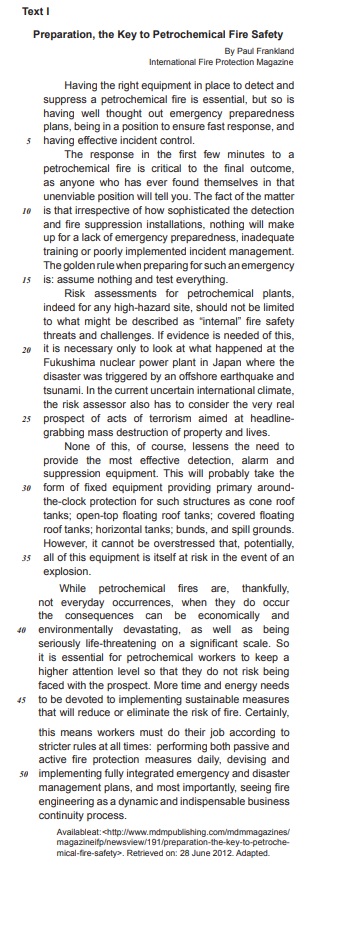
In Text I, the word do in the fragments: “when they do occur"(line 38); “they do not risk being faced"(lines 43-44) and “workers must do their job"(line 47) respectively, fulfill the role of
Ano: 2012
Banca:
AOCP
Órgão:
TCE-PA
Prova:
AOCP - 2012 - TCE-PA - Assessor Técnico de Informática - Analista de Suporte |
Q271124
Inglês
Texto associado
How to Download YouTube Videos
If you want to download YouTube videos without having to pay a fee, install a toolbar, or run a dubious browser plugin, check out our handy guide to using YouTube Downloader HD. If you're like most PCWorld readers, you probably have a few classic YouTube videos you love to share with friends, family, and coworkers. That's all fine and good when you're connected to the Internet, but what if you want to save a few of your favorite videos to a USB stick or burn some memorable clips to disc as a gift? If you want to download YouTube videos without having to pay a fee, install a toolbar, or run a dubious browser plug-in, we suggest you use YouTube Downloader HD. A free downloadable program, YouTube Downloader HD keeps things simple: You provide the URL of the video, select the video quality and format, and click the Download button. YouTube Downloader HD has a limited selection of output formats and can't download from video sites other than YouTube, but it still shines with its adware-free installation, ability to download multiple videos simultaneously, and automatic conversion feature. By Justin Phelps, PCWorld
If you want to download YouTube videos without having to pay a fee, install a toolbar, or run a dubious browser plugin, check out our handy guide to using YouTube Downloader HD. If you're like most PCWorld readers, you probably have a few classic YouTube videos you love to share with friends, family, and coworkers. That's all fine and good when you're connected to the Internet, but what if you want to save a few of your favorite videos to a USB stick or burn some memorable clips to disc as a gift? If you want to download YouTube videos without having to pay a fee, install a toolbar, or run a dubious browser plug-in, we suggest you use YouTube Downloader HD. A free downloadable program, YouTube Downloader HD keeps things simple: You provide the URL of the video, select the video quality and format, and click the Download button. YouTube Downloader HD has a limited selection of output formats and can't download from video sites other than YouTube, but it still shines with its adware-free installation, ability to download multiple videos simultaneously, and automatic conversion feature. By Justin Phelps, PCWorld
No extrato de sentença seguinte: “…but it still shines with its adware-free installation, ability to download multiple videos simultaneously, and automatic conversion feature.”, há um verbo explicitamente marcado no Presente Simples, na 3ª pessoa do singular. Assinale qual o verbo que carrega essa característica.
Ano: 2012
Banca:
AOCP
Órgão:
TCE-PA
Provas:
AOCP - 2012 - TCE-PA - Assessor Técnico de Informática - Analista de Suporte
|
AOCP - 2012 - TCE-PA - Assessor Técnico de Informática - Analista de Sistemas |
Q271123
Inglês
Texto associado
How to Download YouTube Videos
If you want to download YouTube videos without having to pay a fee, install a toolbar, or run a dubious browser plugin, check out our handy guide to using YouTube Downloader HD. If you're like most PCWorld readers, you probably have a few classic YouTube videos you love to share with friends, family, and coworkers. That's all fine and good when you're connected to the Internet, but what if you want to save a few of your favorite videos to a USB stick or burn some memorable clips to disc as a gift? If you want to download YouTube videos without having to pay a fee, install a toolbar, or run a dubious browser plug-in, we suggest you use YouTube Downloader HD. A free downloadable program, YouTube Downloader HD keeps things simple: You provide the URL of the video, select the video quality and format, and click the Download button. YouTube Downloader HD has a limited selection of output formats and can't download from video sites other than YouTube, but it still shines with its adware-free installation, ability to download multiple videos simultaneously, and automatic conversion feature. By Justin Phelps, PCWorld
If you want to download YouTube videos without having to pay a fee, install a toolbar, or run a dubious browser plugin, check out our handy guide to using YouTube Downloader HD. If you're like most PCWorld readers, you probably have a few classic YouTube videos you love to share with friends, family, and coworkers. That's all fine and good when you're connected to the Internet, but what if you want to save a few of your favorite videos to a USB stick or burn some memorable clips to disc as a gift? If you want to download YouTube videos without having to pay a fee, install a toolbar, or run a dubious browser plug-in, we suggest you use YouTube Downloader HD. A free downloadable program, YouTube Downloader HD keeps things simple: You provide the URL of the video, select the video quality and format, and click the Download button. YouTube Downloader HD has a limited selection of output formats and can't download from video sites other than YouTube, but it still shines with its adware-free installation, ability to download multiple videos simultaneously, and automatic conversion feature. By Justin Phelps, PCWorld
Quando seguindo um manual de instalação, por exemplo, temos vários comandos dados na “forma imperativa”, ou seja, como se fossem ordens.
Assinale a questão que não se encontra na forma imperativa.
Assinale a questão que não se encontra na forma imperativa.
Ano: 2012
Banca:
AOCP
Órgão:
TCE-PA
Provas:
AOCP - 2012 - TCE-PA - Assessor Técnico de Informática - Administrador de Banco de Dados
|
AOCP - 2012 - TCE-PA - Assessor Técnico de Informática - Analista de Segurança |
Q270966
Inglês
HOW TO INSTALL ADOBE READER 6
1. Uninstall all previous versions of Adobe Reader.
a. Click “Start" > “Control Panel" > “Add/Remove Programs".
b. Select “Adobe Reader X.x", where X.x is a previous version.
c. Click on the “Remove" button and follow all prompts to uninstall.
d. Repeat for each previous version found.
2. Determine your version of Microsoft Windows.
a. Click Start, then right-click on “My Computer".
b. Select “Properties" from the sub-menu.
c. The properties dialog will display your version of Windows, for example:
NOTE: Your computer must have at least Microsoft Windows 98 Second Edition installed to use Adobe Reader 6. If you are using Microsoft Windows 98 or Windows 95, you will not be able to use Adobe Reader 6. In this case, please install Adobe Reader 5, which will automatically be chosen for you in the following steps. Note that you may observe peculiar behavior with Adobe Reader 5 on the NRS website, but without any version of Adobe Reader, you will not be able to open and download NRS forms.
Answer the following question according to the text above:
MUST é um auxiliar modal que indica que algo
1. Uninstall all previous versions of Adobe Reader.
a. Click “Start" > “Control Panel" > “Add/Remove Programs".
b. Select “Adobe Reader X.x", where X.x is a previous version.
c. Click on the “Remove" button and follow all prompts to uninstall.
d. Repeat for each previous version found.
2. Determine your version of Microsoft Windows.
a. Click Start, then right-click on “My Computer".
b. Select “Properties" from the sub-menu.
c. The properties dialog will display your version of Windows, for example:
NOTE: Your computer must have at least Microsoft Windows 98 Second Edition installed to use Adobe Reader 6. If you are using Microsoft Windows 98 or Windows 95, you will not be able to use Adobe Reader 6. In this case, please install Adobe Reader 5, which will automatically be chosen for you in the following steps. Note that you may observe peculiar behavior with Adobe Reader 5 on the NRS website, but without any version of Adobe Reader, you will not be able to open and download NRS forms.
Answer the following question according to the text above:
MUST é um auxiliar modal que indica que algo
Ano: 2012
Banca:
AOCP
Órgão:
TCE-PA
Provas:
AOCP - 2012 - TCE-PA - Assessor Técnico de Informática - Administrador de Banco de Dados
|
AOCP - 2012 - TCE-PA - Assessor Técnico de Informática - Analista de Segurança |
Q270965
Inglês
HOW TO INSTALL ADOBE READER 6
1. Uninstall all previous versions of Adobe Reader.
a. Click “Start" > “Control Panel" > “Add/Remove Programs".
b. Select “Adobe Reader X.x", where X.x is a previous version.
c. Click on the “Remove" button and follow all prompts to uninstall.
d. Repeat for each previous version found.
2. Determine your version of Microsoft Windows.
a. Click Start, then right-click on “My Computer".
b. Select “Properties" from the sub-menu.
c. The properties dialog will display your version of Windows, for example:
NOTE: Your computer must have at least Microsoft Windows 98 Second Edition installed to use Adobe Reader 6. If you are using Microsoft Windows 98 or Windows 95, you will not be able to use Adobe Reader 6. In this case, please install Adobe Reader 5, which will automatically be chosen for you in the following steps. Note that you may observe peculiar behavior with Adobe Reader 5 on the NRS website, but without any version of Adobe Reader, you will not be able to open and download NRS forms.
Answer the following question according to the text above:
Quando temos um texto com instruções, ele será muito provavelmente disposto no Imperativo, que é habitualmente apresentado em forma de comandos. Identifique nas sentenças abaixo a alternativa no “Modo Imperativo":
1. Uninstall all previous versions of Adobe Reader.
a. Click “Start" > “Control Panel" > “Add/Remove Programs".
b. Select “Adobe Reader X.x", where X.x is a previous version.
c. Click on the “Remove" button and follow all prompts to uninstall.
d. Repeat for each previous version found.
2. Determine your version of Microsoft Windows.
a. Click Start, then right-click on “My Computer".
b. Select “Properties" from the sub-menu.
c. The properties dialog will display your version of Windows, for example:
NOTE: Your computer must have at least Microsoft Windows 98 Second Edition installed to use Adobe Reader 6. If you are using Microsoft Windows 98 or Windows 95, you will not be able to use Adobe Reader 6. In this case, please install Adobe Reader 5, which will automatically be chosen for you in the following steps. Note that you may observe peculiar behavior with Adobe Reader 5 on the NRS website, but without any version of Adobe Reader, you will not be able to open and download NRS forms.
Answer the following question according to the text above:
Quando temos um texto com instruções, ele será muito provavelmente disposto no Imperativo, que é habitualmente apresentado em forma de comandos. Identifique nas sentenças abaixo a alternativa no “Modo Imperativo":
Ano: 2012
Banca:
CESGRANRIO
Órgão:
Chesf
Provas:
CESGRANRIO - 2012 - Chesf - Profissional de Nível Superior - Analista de Sistemas
|
CESGRANRIO - 2012 - Chesf - Profissional de Nível Superior - Administração |
CESGRANRIO - 2012 - Chesf - Profissional de Nível Superior - Eletrônica ou Telecomunicações |
Q258802
Inglês

In Text I, the excerpt, “the world could face a future of “water wars” ” (lines 9-10), the verb form in bold expresses the idea of
Ano: 2012
Banca:
CESGRANRIO
Órgão:
CMB
Prova:
CESGRANRIO - 2012 - CMB - Assistente Técnico Administrativo - Programador de Computador |
Q252852
Inglês

The excerpt that includes a word (modal) in bold that conveys the meaning “of obligation” is:
Ano: 2012
Banca:
CESGRANRIO
Órgão:
Transpetro
Provas:
CESGRANRIO - 2012 - Transpetro - Médico do Trabalho Júnior
|
CESGRANRIO - 2012 - Transpetro - Contador Júnior |
CESGRANRIO - 2012 - Transpetro - Químico de Petróleo Júnior |
CESGRANRIO - 2012 - Transpetro - Engenheiro Júnior - Naval |
CESGRANRIO - 2012 - Transpetro - Administrador Júnior |
CESGRANRIO - 2012 - Transpetro - Bibliotecário Júnior |
CESGRANRIO - 2012 - Transpetro - Analista de Sistemas Júnior - Infra-Estrutura |
CESGRANRIO - 2012 - Transpetro - Engenheiro Júnior - Automação |
CESGRANRIO - 2012 - Transpetro - Engenheiro Júnior - Elétrica |
CESGRANRIO - 2012 - Transpetro - Engenheiro Júnior - Segurança |
CESGRANRIO - 2012 - Transpetro - Profissional de Meio Ambiente Júnior |
CESGRANRIO - 2012 - Transpetro - Engenheiro Júnior - Mecânica |
Q252458
Inglês
Texto associado
Safety Meeting Presentation
Today's meeting is really about you. I can stand
in front of you and talk about working safely and what
procedures to follow until I'm blue in the face. But until
you understand the need for working safely, until you
are willing to be responsible for your safety, it doesn't
mean a whole lot.
Some of you may be familiar with OSHA - the Occupational Safety & Health Administration. The sole purpose of this agency is to keep American workers safe. Complying with OSHA regulations isn't always easy, but if we work together, we can do it. Yet, complying with regulations is not the real reason for working safely. Our real motive is simple. We care about each and every one of you and will do what is necessary to prevent you from being injured.
However, keeping our workplace safe takes input from everyone. Management, supervisor, and all of you have to come together on this issue, or we're in trouble. For example, upper management has to approve the purchase of safe equipment. Supervisors, including myself, have to ensure that each of you knows how to use that equipment safely. Then it's up to you to follow through the task and use the equipment as you were trained. If any one part of this chain fails, accidents are going to happen and people are going to get hurt.
Responsibility Number One - Recognize Hazards
At the core of your safety responsibilities lies the task of recognizing safety and health hazards. In order to do that, you must first understand what constitutes a hazard. Extreme hazards are often obvious. Our hopes are that you won't find too many of those around here.
There are, however, more subtle hazards that won't jump up and bite you. As a result of your safety training and meetings like these, some things may come to mind. For example, a machine may not be easy to lock out. Common practice may be to use a tag. This is a potential hazard and should be discussed. Maybe something can be changed to make it easier to use a lock. Other subtle hazards include such things as frayed electrical cords, a loose machine guard, a cluttered aisle, or maybe something that just doesn't look right.
Responsibility Number Two - Report Hazards
A big part of recognizing hazards is using your instincts. Nobody knows your job as well as you do, so we're counting on you to let us know about possible problems. Beyond recognizing hazards, you have to correct them or report them to someone who can. This too, is a judgement call. For example, if something spills in your work area you can probably clean it up yourself. However, if there is an unlabeled chemical container and you have no idea what it is, you should report it to your supervisor.
Additional Employee Responsibilities
Good housekeeping is a major part of keeping your work area safe. For example, you should take a few minutes each day to ensure that aisles, hallways, and stairways in your work area are not obstructed. If boxes, equipment, or anything else is left to pile up, you have a tripping hazard on your hands. Those obstructions could keep you from exiting the building quickly and safely should you face an emergency situation.
Also watch out for spills. These can lead to slips and falls. Flammable materials are another thing to be aware of. Make sure they are disposed of properly.
Keep Thinking. Even if you're doing your job safely and you are avoiding hazards, there are often even better ways to work safely. If you have ideas for improving the safety of your job or that of co-workers, share them.
Concluding Remarks
While nothing we do can completely eliminate the threat of an incident, we can work together to improve our odds. As I said, this must be a real team effort and I'm counting on input from all of you. Let's keep communicating and continue to improve safety.
Available at: <http://www.ncsu.edu/ehs/www99/right/training/meeting/emplores.html>.Retrieved on: April 1st, 2012. Adapted.
Some of you may be familiar with OSHA - the Occupational Safety & Health Administration. The sole purpose of this agency is to keep American workers safe. Complying with OSHA regulations isn't always easy, but if we work together, we can do it. Yet, complying with regulations is not the real reason for working safely. Our real motive is simple. We care about each and every one of you and will do what is necessary to prevent you from being injured.
However, keeping our workplace safe takes input from everyone. Management, supervisor, and all of you have to come together on this issue, or we're in trouble. For example, upper management has to approve the purchase of safe equipment. Supervisors, including myself, have to ensure that each of you knows how to use that equipment safely. Then it's up to you to follow through the task and use the equipment as you were trained. If any one part of this chain fails, accidents are going to happen and people are going to get hurt.
Responsibility Number One - Recognize Hazards
At the core of your safety responsibilities lies the task of recognizing safety and health hazards. In order to do that, you must first understand what constitutes a hazard. Extreme hazards are often obvious. Our hopes are that you won't find too many of those around here.
There are, however, more subtle hazards that won't jump up and bite you. As a result of your safety training and meetings like these, some things may come to mind. For example, a machine may not be easy to lock out. Common practice may be to use a tag. This is a potential hazard and should be discussed. Maybe something can be changed to make it easier to use a lock. Other subtle hazards include such things as frayed electrical cords, a loose machine guard, a cluttered aisle, or maybe something that just doesn't look right.
Responsibility Number Two - Report Hazards
A big part of recognizing hazards is using your instincts. Nobody knows your job as well as you do, so we're counting on you to let us know about possible problems. Beyond recognizing hazards, you have to correct them or report them to someone who can. This too, is a judgement call. For example, if something spills in your work area you can probably clean it up yourself. However, if there is an unlabeled chemical container and you have no idea what it is, you should report it to your supervisor.
Additional Employee Responsibilities
Good housekeeping is a major part of keeping your work area safe. For example, you should take a few minutes each day to ensure that aisles, hallways, and stairways in your work area are not obstructed. If boxes, equipment, or anything else is left to pile up, you have a tripping hazard on your hands. Those obstructions could keep you from exiting the building quickly and safely should you face an emergency situation.
Also watch out for spills. These can lead to slips and falls. Flammable materials are another thing to be aware of. Make sure they are disposed of properly.
Keep Thinking. Even if you're doing your job safely and you are avoiding hazards, there are often even better ways to work safely. If you have ideas for improving the safety of your job or that of co-workers, share them.
Concluding Remarks
While nothing we do can completely eliminate the threat of an incident, we can work together to improve our odds. As I said, this must be a real team effort and I'm counting on input from all of you. Let's keep communicating and continue to improve safety.
Available at: <http://www.ncsu.edu/ehs/www99/right/training/meeting/emplores.html>.Retrieved on: April 1st, 2012. Adapted.
The modal auxiliary in boldface conveys the idea of obligation in the fragment:
Ano: 2012
Banca:
CESGRANRIO
Órgão:
Petrobras
Provas:
CESGRANRIO - 2012 - Petrobras - Engenheiro Agrônomo Júnior-2012
|
CESGRANRIO - 2012 - Petrobras - Analista de Sistemas Júnior - Engenharia de Software-2012 |
CESGRANRIO - 2012 - Petrobras - Nível Superior - Todos os Cargos-2012 |
CESGRANRIO - 2012 - Petrobras - Analista de Sistemas Júnior - Processos de Negócios-2012 |
CESGRANRIO - 2012 - Petrobras - Engenheiro de Produção Júnior-2012 |
CESGRANRIO - 2012 - Petrobras - Engenheiro de Petróleo Júnior-2012 |
CESGRANRIO - 2012 - Petrobras - Engenheiro de Equipamento Júnior - Eletrônica-2012 |
CESGRANRIO - 2012 - Petrobras - Engenheiro de Equipamento Júnior - Mecânica-2012 |
CESGRANRIO - 2012 - Petrobras - Engenheiro de Equipamento Júnior - Elétrica-2012 |
CESGRANRIO - 2012 - Petrobras - Engenheiro Civil Júnior-2012 |
CESGRANRIO - 2012 - Petrobras - Engenheiro de Processamento Júnior-2012 |
CESGRANRIO - 2012 - Petrobras - Engenheiro de Equipamento Júnior - Inspeção-2012 |
CESGRANRIO - 2012 - Petrobras - Profissional de Comunicação Social Júnior - Relações Públicas |
CESGRANRIO - 2012 - Petrobras - Médico do Trabalho Júnior-2012 |
CESGRANRIO - 2012 - Petrobras - Advogado Júnior-2012 |
CESGRANRIO - 2012 - Petrobras - Psicólogo Júnior-2012 |
CESGRANRIO - 2012 - Petrobras - Geólogo Júnior-2012 |
CESGRANRIO - 2012 - Petrobras - Geofísico Júnior - Física-2012 |
Q244264
Inglês

In Text I, the expression “turn down” in “I couldn’t turn down the great starting salary and a chance to live in New Orleans” (lines 12-14) could be replaced, without change in meaning, by

 Conheça nossos planos