Questões de Concurso
Sobre palavras conectivas | connective words em inglês
Foram encontradas 684 questões


Ano: 2012
Banca:
CESGRANRIO
Órgão:
Innova
Provas:
CESGRANRIO - 2012 - Innova - Advogado Júnior
|
CESGRANRIO - 2012 - Innova - Analista de Sistemas Júnior |
CESGRANRIO - 2012 - Innova - Administrador Júnior |
CESGRANRIO - 2012 - Innova - Contador Júnior |
CESGRANRIO - 2012 - Innova - Médico do Trabalho Júnior |
CESGRANRIO - 2012 - Innova - Engenheiro de Equipamento Júnior - Mecânica |
CESGRANRIO - 2012 - Innova - Engenheiro de Equipamento Júnior - Elétrica |
Q276489
Inglês
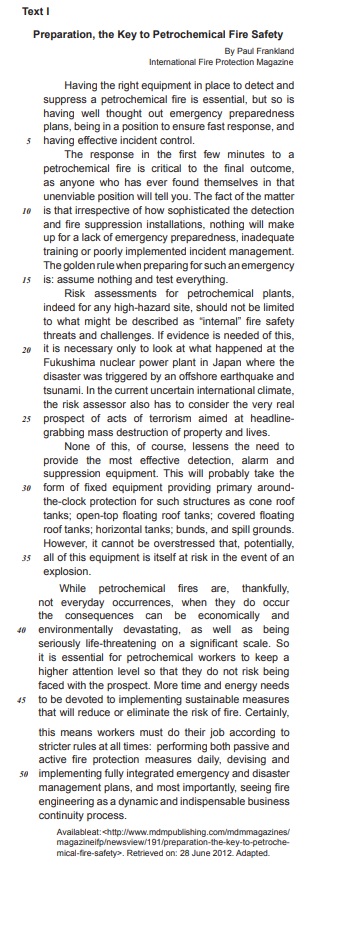
In Text I, the particle so(line 2) means
Ano: 2012
Banca:
CESGRANRIO
Órgão:
Transpetro
Provas:
CESGRANRIO - 2012 - Transpetro - Médico do Trabalho Júnior
|
CESGRANRIO - 2012 - Transpetro - Contador Júnior |
CESGRANRIO - 2012 - Transpetro - Químico de Petróleo Júnior |
CESGRANRIO - 2012 - Transpetro - Administrador Júnior |
CESGRANRIO - 2012 - Transpetro - Analista de Sistemas Júnior - Infra-Estrutura |
CESGRANRIO - 2012 - Transpetro - Engenheiro Júnior - Automação |
CESGRANRIO - 2012 - Transpetro - Engenheiro Júnior - Elétrica |
CESGRANRIO - 2012 - Transpetro - Engenheiro Júnior - Segurança |
CESGRANRIO - 2012 - Transpetro - Profissional de Meio Ambiente Júnior |
CESGRANRIO - 2012 - Transpetro - Engenheiro Júnior - Mecânica |
Q252460
Inglês
Texto associado
Safety Meeting Presentation
Today's meeting is really about you. I can stand
in front of you and talk about working safely and what
procedures to follow until I'm blue in the face. But until
you understand the need for working safely, until you
are willing to be responsible for your safety, it doesn't
mean a whole lot.
Some of you may be familiar with OSHA - the Occupational Safety & Health Administration. The sole purpose of this agency is to keep American workers safe. Complying with OSHA regulations isn't always easy, but if we work together, we can do it. Yet, complying with regulations is not the real reason for working safely. Our real motive is simple. We care about each and every one of you and will do what is necessary to prevent you from being injured.
However, keeping our workplace safe takes input from everyone. Management, supervisor, and all of you have to come together on this issue, or we're in trouble. For example, upper management has to approve the purchase of safe equipment. Supervisors, including myself, have to ensure that each of you knows how to use that equipment safely. Then it's up to you to follow through the task and use the equipment as you were trained. If any one part of this chain fails, accidents are going to happen and people are going to get hurt.
Responsibility Number One - Recognize Hazards
At the core of your safety responsibilities lies the task of recognizing safety and health hazards. In order to do that, you must first understand what constitutes a hazard. Extreme hazards are often obvious. Our hopes are that you won't find too many of those around here.
There are, however, more subtle hazards that won't jump up and bite you. As a result of your safety training and meetings like these, some things may come to mind. For example, a machine may not be easy to lock out. Common practice may be to use a tag. This is a potential hazard and should be discussed. Maybe something can be changed to make it easier to use a lock. Other subtle hazards include such things as frayed electrical cords, a loose machine guard, a cluttered aisle, or maybe something that just doesn't look right.
Responsibility Number Two - Report Hazards
A big part of recognizing hazards is using your instincts. Nobody knows your job as well as you do, so we're counting on you to let us know about possible problems. Beyond recognizing hazards, you have to correct them or report them to someone who can. This too, is a judgement call. For example, if something spills in your work area you can probably clean it up yourself. However, if there is an unlabeled chemical container and you have no idea what it is, you should report it to your supervisor.
Additional Employee Responsibilities
Good housekeeping is a major part of keeping your work area safe. For example, you should take a few minutes each day to ensure that aisles, hallways, and stairways in your work area are not obstructed. If boxes, equipment, or anything else is left to pile up, you have a tripping hazard on your hands. Those obstructions could keep you from exiting the building quickly and safely should you face an emergency situation.
Also watch out for spills. These can lead to slips and falls. Flammable materials are another thing to be aware of. Make sure they are disposed of properly.
Keep Thinking. Even if you're doing your job safely and you are avoiding hazards, there are often even better ways to work safely. If you have ideas for improving the safety of your job or that of co-workers, share them.
Concluding Remarks
While nothing we do can completely eliminate the threat of an incident, we can work together to improve our odds. As I said, this must be a real team effort and I'm counting on input from all of you. Let's keep communicating and continue to improve safety.
Available at: <http://www.ncsu.edu/ehs/www99/right/training/meeting/emplores.html>.Retrieved on: April 1st, 2012. Adapted.
Some of you may be familiar with OSHA - the Occupational Safety & Health Administration. The sole purpose of this agency is to keep American workers safe. Complying with OSHA regulations isn't always easy, but if we work together, we can do it. Yet, complying with regulations is not the real reason for working safely. Our real motive is simple. We care about each and every one of you and will do what is necessary to prevent you from being injured.
However, keeping our workplace safe takes input from everyone. Management, supervisor, and all of you have to come together on this issue, or we're in trouble. For example, upper management has to approve the purchase of safe equipment. Supervisors, including myself, have to ensure that each of you knows how to use that equipment safely. Then it's up to you to follow through the task and use the equipment as you were trained. If any one part of this chain fails, accidents are going to happen and people are going to get hurt.
Responsibility Number One - Recognize Hazards
At the core of your safety responsibilities lies the task of recognizing safety and health hazards. In order to do that, you must first understand what constitutes a hazard. Extreme hazards are often obvious. Our hopes are that you won't find too many of those around here.
There are, however, more subtle hazards that won't jump up and bite you. As a result of your safety training and meetings like these, some things may come to mind. For example, a machine may not be easy to lock out. Common practice may be to use a tag. This is a potential hazard and should be discussed. Maybe something can be changed to make it easier to use a lock. Other subtle hazards include such things as frayed electrical cords, a loose machine guard, a cluttered aisle, or maybe something that just doesn't look right.
Responsibility Number Two - Report Hazards
A big part of recognizing hazards is using your instincts. Nobody knows your job as well as you do, so we're counting on you to let us know about possible problems. Beyond recognizing hazards, you have to correct them or report them to someone who can. This too, is a judgement call. For example, if something spills in your work area you can probably clean it up yourself. However, if there is an unlabeled chemical container and you have no idea what it is, you should report it to your supervisor.
Additional Employee Responsibilities
Good housekeeping is a major part of keeping your work area safe. For example, you should take a few minutes each day to ensure that aisles, hallways, and stairways in your work area are not obstructed. If boxes, equipment, or anything else is left to pile up, you have a tripping hazard on your hands. Those obstructions could keep you from exiting the building quickly and safely should you face an emergency situation.
Also watch out for spills. These can lead to slips and falls. Flammable materials are another thing to be aware of. Make sure they are disposed of properly.
Keep Thinking. Even if you're doing your job safely and you are avoiding hazards, there are often even better ways to work safely. If you have ideas for improving the safety of your job or that of co-workers, share them.
Concluding Remarks
While nothing we do can completely eliminate the threat of an incident, we can work together to improve our odds. As I said, this must be a real team effort and I'm counting on input from all of you. Let's keep communicating and continue to improve safety.
Available at: <http://www.ncsu.edu/ehs/www99/right/training/meeting/emplores.html>.Retrieved on: April 1st, 2012. Adapted.
The expression in boldface introduces the idea of consequence in the fragment:
Q243011
Inglês


The expressions once and however, in the fragments of the text “Once that desire is satisfied, monetary rewards can take precedence" (lines 28-29) and “However, equally important is a support system for the pilot." (lines 44-45), can be replaced, without change in meaning, by
Ano: 2012
Banca:
FCC
Órgão:
TRT - 6ª Região (PE)
Prova:
FCC - 2012 - TRT - 6ª Região (PE) - Técnico Judiciário - Tecnologia da Informação |
Q242262
Inglês
Texto associado
Atenção: Considere o texto a seguir para responder às questões de números 58 a 60.

A tradução correta de though,conforme empregado no texto, é
Ano: 2012
Banca:
FCC
Órgão:
TRT - 6ª Região (PE)
Prova:
FCC - 2012 - TRT - 6ª Região (PE) - Analista Judiciário - Tecnologia da Informação |
Q241205
Inglês

A palavra que preenche corretamente a lacuna é
Q283502
Inglês

The sentence in which the boldfaced expression introduces an idea of addition is
Ano: 2011
Banca:
CESPE / CEBRASPE
Órgão:
EBC
Prova:
CESPE - 2011 - EBC - Analista - Tradução - Língua Inglesa |
Q273700
Inglês
Texto associado

Based on the text, judge the items from 111 to 120.
Based on the text, judge the items from 111 to 120.
“However” (L.21) can be correctly replaced by notwithstanding.
Ano: 2011
Banca:
CESGRANRIO
Órgão:
BNDES
Provas:
CESGRANRIO - 2011 - BNDES - Profissional Básico - Análise de Sistemas - Desenvolvimento
|
CESGRANRIO - 2011 - BNDES - Profissional Básico - Administração |
CESGRANRIO - 2011 - BNDES - Profissional Básico - Contabilidade |
CESGRANRIO - 2011 - BNDES - Profissional Básico - Comunicação Social |
CESGRANRIO - 2011 - BNDES - Profissional Básico - Economia |
Q261111
Inglês

In “Once we stop, we lose their benefit.” (line 92) the word “once” can be replaced, without changing the meaning of the sentence, by
Ano: 2011
Banca:
CESGRANRIO
Órgão:
FINEP
Provas:
CESGRANRIO - 2011 - FINEP - Analista - Jurídica
|
CESGRANRIO - 2011 - FINEP - Analista de Suporte |
Q201091
Inglês
The boldfaced item can be replaced by the word in parentheses, without change in meaning, in
Q200119
Inglês


The boldfaced item is synonymous with the expression in parentheses in
Ano: 2011
Banca:
CESGRANRIO
Órgão:
PETROQUÍMICA SUAPE
Provas:
CESGRANRIO - 2011 - PETROQUÍMICA SUAPE - Engenheiro de Processamento Júnior
|
CESGRANRIO - 2011 - PETROQUÍMICA SUAPE - Engenheiro de Manutenção Pleno - Mecânica |
CESGRANRIO - 2011 - PETROQUÍMICA SUAPE - Engenheiro de Manutenção Pleno - Elétrica |
Q181780
Inglês
Texto associado
Cleaning up a spill
Written by Laura Hill
Water and oil don’t mix. We see this every day; just try washing olive oil off your hands without soap or washing your face in the morning with only water. It just doesn’t work!
When an oil spill occurs in the ocean, like the catastrophe in the Gulf of Mexico, what do scientists do to clean up the toxic mess? There are a number of options for an oil spill cleanup and most efforts use a combination of many techniques. The fact that oil and water don’t mix is a blessing and a curse. If oil mixed with water, it would be difficult to divide the two.
Crude oil is less dense than water; it spreads out to make a very thin layer (about one millimetre thick) that floats on top of the water. This is good because we can tell what is water and what is oil. It is also bad, because it means the oil can spread really quickly and cover a very large area, which becomes difficult to manage. Combined with wind, ocean currents and waves, oil spill cleanup starts to get really tricky.
Chemical dispersants can be used to break up big oil slicks into small oil droplets. They work like soaps by emulsifying the hydrophobic (waterrepelling) oil in the water. These small droplets can degrade in the ecosystem quicker than the big oil slick. But unfortunately, this means that marine life of all sizes ingest these toxic, broken-down particles and chemicals.
If the oil is thick enough, it could be set fire, a process called “in situ burning”. Because the oil is highly flammable and floats on top of the water, it is very easy to set it alight. It’s not environmentallyfriendly though; the combustion of oil releases thick smoke that contains greenhouse gases and other dangerous air pollutants.
Some techniques can contain and recapture spilled oil without changing its chemical composition. Booms float on top of the water and act as barriers to the movement of oil. Once the oil is controlled, it can be gathered using sorbents. “Sorbent” is a fancy word for sponge. These sponges absorb the oil and allow it to be collected by siphoning it off the water.
However, weather and sea conditions can prevent and obstruct the use of booms, sorbents and in situ burning. Imagine trying to perform these operations on the open sea with wind, waves and water currents moving the oil (and your boat!) around on the water.
What about the plants and animals? It’s easy to forget about the organisms in the sea that are under water. Out of sight, out of mind! There is not much we can do to help them. But when oil reaches the shore it impacts sensitive coastal environments including the many fish, bird, amphibian, reptilian, and crustaceanspecies that live there. We have easy access to these areas and there are some things we can do to clean up. For the plants, it is often a matter of setting them on fire, or leaving them to degrade the oil naturally. Sometimes, we can spray the oil with nutrients (phosphorus and nitrogen) that can encourage the growth of specialized microorganisms. For species that can tolerate our soaps, manpower is needed to wash every affected animal. Yet, if the animal has tried to lick itself clean, it can die from ingesting the toxic oil.
Unfortunately, there can be many negative economic and social impacts, in addition to the environmental impacts of oil spills and, as you’ve just read, the clean up techniques are far from perfect. Prevention is the very best cleanup technique we have. http://www.curiocity.ca/everyday-science/environme... -cleaning-up-a-spill.html, retrieved on Dec 10, 2010
Written by Laura Hill
Water and oil don’t mix. We see this every day; just try washing olive oil off your hands without soap or washing your face in the morning with only water. It just doesn’t work!
When an oil spill occurs in the ocean, like the catastrophe in the Gulf of Mexico, what do scientists do to clean up the toxic mess? There are a number of options for an oil spill cleanup and most efforts use a combination of many techniques. The fact that oil and water don’t mix is a blessing and a curse. If oil mixed with water, it would be difficult to divide the two.
Crude oil is less dense than water; it spreads out to make a very thin layer (about one millimetre thick) that floats on top of the water. This is good because we can tell what is water and what is oil. It is also bad, because it means the oil can spread really quickly and cover a very large area, which becomes difficult to manage. Combined with wind, ocean currents and waves, oil spill cleanup starts to get really tricky.
Chemical dispersants can be used to break up big oil slicks into small oil droplets. They work like soaps by emulsifying the hydrophobic (waterrepelling) oil in the water. These small droplets can degrade in the ecosystem quicker than the big oil slick. But unfortunately, this means that marine life of all sizes ingest these toxic, broken-down particles and chemicals.
If the oil is thick enough, it could be set fire, a process called “in situ burning”. Because the oil is highly flammable and floats on top of the water, it is very easy to set it alight. It’s not environmentallyfriendly though; the combustion of oil releases thick smoke that contains greenhouse gases and other dangerous air pollutants.
Some techniques can contain and recapture spilled oil without changing its chemical composition. Booms float on top of the water and act as barriers to the movement of oil. Once the oil is controlled, it can be gathered using sorbents. “Sorbent” is a fancy word for sponge. These sponges absorb the oil and allow it to be collected by siphoning it off the water.
However, weather and sea conditions can prevent and obstruct the use of booms, sorbents and in situ burning. Imagine trying to perform these operations on the open sea with wind, waves and water currents moving the oil (and your boat!) around on the water.
What about the plants and animals? It’s easy to forget about the organisms in the sea that are under water. Out of sight, out of mind! There is not much we can do to help them. But when oil reaches the shore it impacts sensitive coastal environments including the many fish, bird, amphibian, reptilian, and crustaceanspecies that live there. We have easy access to these areas and there are some things we can do to clean up. For the plants, it is often a matter of setting them on fire, or leaving them to degrade the oil naturally. Sometimes, we can spray the oil with nutrients (phosphorus and nitrogen) that can encourage the growth of specialized microorganisms. For species that can tolerate our soaps, manpower is needed to wash every affected animal. Yet, if the animal has tried to lick itself clean, it can die from ingesting the toxic oil.
Unfortunately, there can be many negative economic and social impacts, in addition to the environmental impacts of oil spills and, as you’ve just read, the clean up techniques are far from perfect. Prevention is the very best cleanup technique we have. http://www.curiocity.ca/everyday-science/environme... -cleaning-up-a-spill.html, retrieved on Dec 10, 2010
The only sentence where the boldfaced word DOES NOT express an idea of contrast is
Q177237
Inglês
Texto associado
Computer Systems Analysts
Nearly all organizations rely on computer and information technology (IT) to conduct business and operate efficiently. Computer systems analysts use IT tools to help enterprises of all sizes achieve their goals. They may design and develop new computer systems by choosing and configuring hardware and software, or they may devise ways to apply existing systems resources to additional 5 tasks. Training requirements for computer systems analysts vary depending on the job, but many employers, when hiring computer systems analysts, usually prefer applicants who have a bachelor's degree. Relevant work experience also is very important. Advancement opportunities are good for those with the necessary skills and experience. For more technically complex jobs, people with graduate 10 degrees are preferred. For jobs in a technical or scientific environment, employers often seek applicants who have at least a bachelor's degree in a technical field, such as computer science, information science, applied mathematics, engineering, or the physical sciences. For jobs in a business environment, employers often seek applicants with at least a bachelor" degree in a business-related field such as management information systems (MIS). Increasingly, employers are seeking individuals 15 who have a master's degree in business administration (MBA) with a concentration in information systems. Despite the preference for technical degrees, however, people who have degrees in other areas may find employment as systems analysts if they also have technical skills. Courses in computer science or related subjects combined with practical experience can qualify people for some jobs in the 20 occupation. Employers generally look for people with expertise relevant to the job. For example, systems analysts who wish to work for a bank may need some expertise in finance, and systems analysts who wish to work for a hospital may need some knowledge of health management. Furthermore, business enterprises generally prefer individuals with information technology, business, and accounting skills and 25 frequently assist employees in obtaining these skills. Technological advances come so rapidly in the computer field that continuous study is necessary to remain competitive. Employers, hardware and software vendors, colleges and universities, and private training institutions offer continuing education to help workers attain the latest skills. Additional training may come from professional development seminars offered by professional 30 computing societies. COMPUTER Systems Analysts. Disponível em: . Acesso em: 5 jan. 2011. Adaptado.
Nearly all organizations rely on computer and information technology (IT) to conduct business and operate efficiently. Computer systems analysts use IT tools to help enterprises of all sizes achieve their goals. They may design and develop new computer systems by choosing and configuring hardware and software, or they may devise ways to apply existing systems resources to additional 5 tasks. Training requirements for computer systems analysts vary depending on the job, but many employers, when hiring computer systems analysts, usually prefer applicants who have a bachelor's degree. Relevant work experience also is very important. Advancement opportunities are good for those with the necessary skills and experience. For more technically complex jobs, people with graduate 10 degrees are preferred. For jobs in a technical or scientific environment, employers often seek applicants who have at least a bachelor's degree in a technical field, such as computer science, information science, applied mathematics, engineering, or the physical sciences. For jobs in a business environment, employers often seek applicants with at least a bachelor" degree in a business-related field such as management information systems (MIS). Increasingly, employers are seeking individuals 15 who have a master's degree in business administration (MBA) with a concentration in information systems. Despite the preference for technical degrees, however, people who have degrees in other areas may find employment as systems analysts if they also have technical skills. Courses in computer science or related subjects combined with practical experience can qualify people for some jobs in the 20 occupation. Employers generally look for people with expertise relevant to the job. For example, systems analysts who wish to work for a bank may need some expertise in finance, and systems analysts who wish to work for a hospital may need some knowledge of health management. Furthermore, business enterprises generally prefer individuals with information technology, business, and accounting skills and 25 frequently assist employees in obtaining these skills. Technological advances come so rapidly in the computer field that continuous study is necessary to remain competitive. Employers, hardware and software vendors, colleges and universities, and private training institutions offer continuing education to help workers attain the latest skills. Additional training may come from professional development seminars offered by professional 30 computing societies. COMPUTER Systems Analysts. Disponível em: . Acesso em: 5 jan. 2011. Adaptado.
O conectivo “Furthermore” (linha 23) expressa
Q177234
Inglês
Texto associado
Computer Systems Analysts
Nearly all organizations rely on computer and information technology (IT) to conduct business and operate efficiently. Computer systems analysts use IT tools to help enterprises of all sizes achieve their goals. They may design and develop new computer systems by choosing and configuring hardware and software, or they may devise ways to apply existing systems resources to additional 5 tasks. Training requirements for computer systems analysts vary depending on the job, but many employers, when hiring computer systems analysts, usually prefer applicants who have a bachelor's degree. Relevant work experience also is very important. Advancement opportunities are good for those with the necessary skills and experience. For more technically complex jobs, people with graduate 10 degrees are preferred. For jobs in a technical or scientific environment, employers often seek applicants who have at least a bachelor's degree in a technical field, such as computer science, information science, applied mathematics, engineering, or the physical sciences. For jobs in a business environment, employers often seek applicants with at least a bachelor" degree in a business-related field such as management information systems (MIS). Increasingly, employers are seeking individuals 15 who have a master's degree in business administration (MBA) with a concentration in information systems. Despite the preference for technical degrees, however, people who have degrees in other areas may find employment as systems analysts if they also have technical skills. Courses in computer science or related subjects combined with practical experience can qualify people for some jobs in the 20 occupation. Employers generally look for people with expertise relevant to the job. For example, systems analysts who wish to work for a bank may need some expertise in finance, and systems analysts who wish to work for a hospital may need some knowledge of health management. Furthermore, business enterprises generally prefer individuals with information technology, business, and accounting skills and 25 frequently assist employees in obtaining these skills. Technological advances come so rapidly in the computer field that continuous study is necessary to remain competitive. Employers, hardware and software vendors, colleges and universities, and private training institutions offer continuing education to help workers attain the latest skills. Additional training may come from professional development seminars offered by professional 30 computing societies. COMPUTER Systems Analysts. Disponível em: . Acesso em: 5 jan. 2011. Adaptado.
Nearly all organizations rely on computer and information technology (IT) to conduct business and operate efficiently. Computer systems analysts use IT tools to help enterprises of all sizes achieve their goals. They may design and develop new computer systems by choosing and configuring hardware and software, or they may devise ways to apply existing systems resources to additional 5 tasks. Training requirements for computer systems analysts vary depending on the job, but many employers, when hiring computer systems analysts, usually prefer applicants who have a bachelor's degree. Relevant work experience also is very important. Advancement opportunities are good for those with the necessary skills and experience. For more technically complex jobs, people with graduate 10 degrees are preferred. For jobs in a technical or scientific environment, employers often seek applicants who have at least a bachelor's degree in a technical field, such as computer science, information science, applied mathematics, engineering, or the physical sciences. For jobs in a business environment, employers often seek applicants with at least a bachelor" degree in a business-related field such as management information systems (MIS). Increasingly, employers are seeking individuals 15 who have a master's degree in business administration (MBA) with a concentration in information systems. Despite the preference for technical degrees, however, people who have degrees in other areas may find employment as systems analysts if they also have technical skills. Courses in computer science or related subjects combined with practical experience can qualify people for some jobs in the 20 occupation. Employers generally look for people with expertise relevant to the job. For example, systems analysts who wish to work for a bank may need some expertise in finance, and systems analysts who wish to work for a hospital may need some knowledge of health management. Furthermore, business enterprises generally prefer individuals with information technology, business, and accounting skills and 25 frequently assist employees in obtaining these skills. Technological advances come so rapidly in the computer field that continuous study is necessary to remain competitive. Employers, hardware and software vendors, colleges and universities, and private training institutions offer continuing education to help workers attain the latest skills. Additional training may come from professional development seminars offered by professional 30 computing societies. COMPUTER Systems Analysts. Disponível em: . Acesso em: 5 jan. 2011. Adaptado.
Na frase “Despite the preference for technical degrees” (linha 17), a palavra em negrito pode ser substituída por
Ano: 2011
Banca:
CESGRANRIO
Órgão:
Transpetro
Provas:
CESGRANRIO - 2011 - Transpetro - Administrador Júnior
|
CESGRANRIO - 2011 - Transpetro - Analista de Sistemas Júnior |
CESGRANRIO - 2011 - Transpetro - Contador Júnior - Contábil |
CESGRANRIO - 2011 - Transpetro - Economista Júnior |
CESGRANRIO - 2011 - Transpetro - Engenheiro Júnior - Engenharia de Produção |
CESGRANRIO - 2011 - Transpetro - Médico do trabalho |
CESGRANRIO - 2011 - Transpetro - Engenheiro Júnior - Análise de Projetos de Inverstimentos |
CESGRANRIO - 2011 - Transpetro - Engenheiro Júnior - Geotécnica |
CESGRANRIO - 2011 - Transpetro - Engenheiro Júnior - Elétrica |
CESGRANRIO - 2011 - Transpetro - Engenheiro Júnior - Mecânica |
CESGRANRIO - 2011 - Transpetro - Profissional de Meio Ambiente Júnior |
CESGRANRIO - 2011 - Transpetro - Engenheiro Júnior - Processamento |
CESGRANRIO - 2011 - Transpetro - Engenheiro Júnior - Segurança |
CESGRANRIO - 2011 - Transpetro - Engenheiro Júnior - Naval |
CESGRANRIO - 2011 - Transpetro - Químico de Petróleo Júnior |
CESGRANRIO - 2011 - Transpetro - Engenheiro Júnior - Automação |
Q154632
Inglês
Texto associado
Model copes with chaos to deliver relief
Computer program helps responders transport
supplies in tough conditions
By Rachel Ehrenberg Science News, Web edition: Monday, February 21st, 2011
WASHINGTON — Getting blood or other perishable supplies to an area that’s been struck by an earthquake or hurricane isn’t as simple as asking what brown can do for you. But a new model quickly determines the best routes and means for delivering humanitarian aid, even in situations where bridges are out or airport tarmacs are clogged with planes.
The research, presented February 18 at the annual meeting of the American Association for the Advancement of Science, could help get supplies to areas which have experienced natural disasters or help prepare for efficient distribution of vaccines when the flu hits.
Efficient supply chains have long been a goal of manufacturers, but transport in fragile networks — where supply, demand and delivery routes may be in extremely rapid flux — requires a different approach, said Anna Nagurney of the University of Massachusetts Amherst, who presented the new work. Rather than considering the shortest path from one place to another to maximize profit, her system aims for the cleanest path at minimum cost, while capturing factors such as the perishability of the product and the uncertainty of supply routes. ‘You don’t know where demand is, so it’s tricky,’ said Nagurney. ‘It’s a multicriteria decision-making problem.’
By calculating the total cost associated with each link in a network, accounting for congestion and incorporating penalties for time and products that are lost, the computer model calculates the best supply chain in situations where standard routes may be disrupted.
‘Mathematical tools are essential to develop formal means to predict, and to respond to, such critical perturbations,’ said Iain Couzin of Princeton University, who uses similar computational tools to study collective animal behavior. ‘This is particularly important where response must be rapid and effective, such as during disaster scenarios … or during epidemics or breaches of national security.
’ The work can be applied to immediate, pressing situations, such as getting blood, food or medication to a disaster site, or to longer-term problems such as determining the best locations for manufacturing flu vaccines. . Retrieved April 7th, 2011.
By Rachel Ehrenberg Science News, Web edition: Monday, February 21st, 2011
WASHINGTON — Getting blood or other perishable supplies to an area that’s been struck by an earthquake or hurricane isn’t as simple as asking what brown can do for you. But a new model quickly determines the best routes and means for delivering humanitarian aid, even in situations where bridges are out or airport tarmacs are clogged with planes.
The research, presented February 18 at the annual meeting of the American Association for the Advancement of Science, could help get supplies to areas which have experienced natural disasters or help prepare for efficient distribution of vaccines when the flu hits.
Efficient supply chains have long been a goal of manufacturers, but transport in fragile networks — where supply, demand and delivery routes may be in extremely rapid flux — requires a different approach, said Anna Nagurney of the University of Massachusetts Amherst, who presented the new work. Rather than considering the shortest path from one place to another to maximize profit, her system aims for the cleanest path at minimum cost, while capturing factors such as the perishability of the product and the uncertainty of supply routes. ‘You don’t know where demand is, so it’s tricky,’ said Nagurney. ‘It’s a multicriteria decision-making problem.’
By calculating the total cost associated with each link in a network, accounting for congestion and incorporating penalties for time and products that are lost, the computer model calculates the best supply chain in situations where standard routes may be disrupted.
‘Mathematical tools are essential to develop formal means to predict, and to respond to, such critical perturbations,’ said Iain Couzin of Princeton University, who uses similar computational tools to study collective animal behavior. ‘This is particularly important where response must be rapid and effective, such as during disaster scenarios … or during epidemics or breaches of national security.
’ The work can be applied to immediate, pressing situations, such as getting blood, food or medication to a disaster site, or to longer-term problems such as determining the best locations for manufacturing flu vaccines. . Retrieved April 7th, 2011.
The expression in boldface introduces the idea of conclusion in
Ano: 2011
Banca:
CESPE / CEBRASPE
Órgão:
Instituto Rio Branco
Prova:
CESPE - 2011 - Instituto Rio Branco - Diplomata 2ª Etapa |
Q127655
Inglês

The particle “as” (l.8) is used in the text
Ano: 2011
Banca:
CESPE / CEBRASPE
Órgão:
Instituto Rio Branco
Prova:
CESPE - 2011 - Instituto Rio Branco - Diplomata 2ª Etapa |
Q127647
Inglês
As far as the semantic and grammar features of the text are concerned, judge if the following items are right (C) or wrong (E).
The word “and” (l.15) is used as a stylistic device to bring together two synonymous words, “earthborn” (l.15) and “earthbound” (l.16).
The word “and” (l.15) is used as a stylistic device to bring together two synonymous words, “earthborn” (l.15) and “earthbound” (l.16).
Ano: 2011
Banca:
CESPE / CEBRASPE
Órgão:
Instituto Rio Branco
Prova:
CESPE - 2011 - Instituto Rio Branco - Diplomata 2ª Etapa |
Q127637
Inglês

According to the text, judge if the following items are right (C) or wrong (E/b>).e
On line 23, “But it is vulnerable to vandalism” can be correctly replaced by Furthermore, it falls prey to vandalism, without change in meaning.
On line 23, “But it is vulnerable to vandalism” can be correctly replaced by Furthermore, it falls prey to vandalism, without change in meaning.
Ano: 2011
Banca:
FCC
Órgão:
TRT - 14ª Região (RO e AC)
Prova:
FCC - 2011 - TRT - 14ª Região (RO e AC) - Técnico Judiciário - Tecnologia da Informação |
Q111553
Inglês

As questões de números 16 a 20 referem-se ao texto.
A palavra que preenche corretamente a lacuna é
é
A palavra que preenche corretamente a lacuna
é
Q105421
Inglês
Texto associado
Technology and legal pressure have changed
spammers’ terms of trade. They long relied on sending
more e-mails from more computers, knowing that some
will get through. But it is hard to send 100m e-mails
without someone noticing. In 2008 researchers from the
University of California at Berkeley and San Diego posed
as spammers, infiltrated a botnet and measured its
success rate. The investigation confirmed only 28 “sales”
on 350m e-mail messages sent, a conversion rate
under .00001%. Since then the numbers have got worse.
But spammers are a creative bunch.
 of tricking
consumers into a purchase, they are stealing their money
directly. Links used to direct the gullible to a site selling
counterfeits. Now they install “Trojan” software that
ransacks hard drives for bank details and the like.
Spammers also have become more sophisticated
about exploiting trust. In few places is it granted more
readily than on social-networking sites. Twitter, a forum for
short, telegram-like messages, estimates that only 1% of
its traffic is spam. But researchers from the University of
California at Berkeley and the University of Illinois at
Champaign-Urbana show that 8% of links published were
shady, with
 of them leading to scams and the rest to
Trojans. Links in Twitter messages, they found, are over
20 times more likely to get clicked than those in e-mail
spam.
Nor is Facebook as safe as it seems. As an
experiment, BitDefender, an online-security firm, set up
fake profiles on the social network and asked strangers to
enter into a digital friendship. They were able to create as
many as 100 new friends a day. Offering a profile picture,
particularly of a pretty woman, increased their odds. When
the firm’s researchers expanded their requests to strangers
who shared even one mutual friend, almost half accepted.
Worse, a quarter of BitDefender’s new friends clicked on
links posted by the firm, even when the destination was
obscured.
(Adapted from http://www.economist.com/node/17519964)
Technology and legal pressure have changed
spammers’ terms of trade. They long relied on sending
more e-mails from more computers, knowing that some
will get through. But it is hard to send 100m e-mails
without someone noticing. In 2008 researchers from the
University of California at Berkeley and San Diego posed
as spammers, infiltrated a botnet and measured its
success rate. The investigation confirmed only 28 “sales”
on 350m e-mail messages sent, a conversion rate
under .00001%. Since then the numbers have got worse.
But spammers are a creative bunch.
of tricking consumers into a purchase, they are stealing their money
directly. Links used to direct the gullible to a site selling
counterfeits. Now they install “Trojan” software that
ransacks hard drives for bank details and the like.
Spammers also have become more sophisticated
about exploiting trust. In few places is it granted more
readily than on social-networking sites. Twitter, a forum for
short, telegram-like messages, estimates that only 1% of
its traffic is spam. But researchers from the University of
California at Berkeley and the University of Illinois at
Champaign-Urbana show that 8% of links published were
shady, with
of them leading to scams and the rest to Trojans. Links in Twitter messages, they found, are over
20 times more likely to get clicked than those in e-mail
spam.
Nor is Facebook as safe as it seems. As an
experiment, BitDefender, an online-security firm, set up
fake profiles on the social network and asked strangers to
enter into a digital friendship. They were able to create as
many as 100 new friends a day. Offering a profile picture,
particularly of a pretty woman, increased their odds. When
the firm’s researchers expanded their requests to strangers
who shared even one mutual friend, almost half accepted.
Worse, a quarter of BitDefender’s new friends clicked on
links posted by the firm, even when the destination was
obscured.
(Adapted from http://www.economist.com/node/17519964)
Em qual das alternativas abaixo like tem o mesmo significado que tem no texto? (2o parágrafo)
Q105418
Inglês
Texto associado
Technology and legal pressure have changed
spammers’ terms of trade. They long relied on sending
more e-mails from more computers, knowing that some
will get through. But it is hard to send 100m e-mails
without someone noticing. In 2008 researchers from the
University of California at Berkeley and San Diego posed
as spammers, infiltrated a botnet and measured its
success rate. The investigation confirmed only 28 “sales”
on 350m e-mail messages sent, a conversion rate
under .00001%. Since then the numbers have got worse.
But spammers are a creative bunch.
of tricking
consumers into a purchase, they are stealing their money
directly. Links used to direct the gullible to a site selling
counterfeits. Now they install “Trojan” software that
ransacks hard drives for bank details and the like.
Spammers also have become more sophisticated
about exploiting trust. In few places is it granted more
readily than on social-networking sites. Twitter, a forum for
short, telegram-like messages, estimates that only 1% of
its traffic is spam. But researchers from the University of
California at Berkeley and the University of Illinois at
Champaign-Urbana show that 8% of links published were
shady, with
of them leading to scams and the rest to
Trojans. Links in Twitter messages, they found, are over
20 times more likely to get clicked than those in e-mail
spam.
Nor is Facebook as safe as it seems. As an
experiment, BitDefender, an online-security firm, set up
fake profiles on the social network and asked strangers to
enter into a digital friendship. They were able to create as
many as 100 new friends a day. Offering a profile picture,
particularly of a pretty woman, increased their odds. When
the firm’s researchers expanded their requests to strangers
who shared even one mutual friend, almost half accepted.
Worse, a quarter of BitDefender’s new friends clicked on
links posted by the firm, even when the destination was
obscured.
(Adapted from http://www.economist.com/node/17519964)
Technology and legal pressure have changed
spammers’ terms of trade. They long relied on sending
more e-mails from more computers, knowing that some
will get through. But it is hard to send 100m e-mails
without someone noticing. In 2008 researchers from the
University of California at Berkeley and San Diego posed
as spammers, infiltrated a botnet and measured its
success rate. The investigation confirmed only 28 “sales”
on 350m e-mail messages sent, a conversion rate
under .00001%. Since then the numbers have got worse.
But spammers are a creative bunch.
of tricking consumers into a purchase, they are stealing their money
directly. Links used to direct the gullible to a site selling
counterfeits. Now they install “Trojan” software that
ransacks hard drives for bank details and the like.
Spammers also have become more sophisticated
about exploiting trust. In few places is it granted more
readily than on social-networking sites. Twitter, a forum for
short, telegram-like messages, estimates that only 1% of
its traffic is spam. But researchers from the University of
California at Berkeley and the University of Illinois at
Champaign-Urbana show that 8% of links published were
shady, with
of them leading to scams and the rest to Trojans. Links in Twitter messages, they found, are over
20 times more likely to get clicked than those in e-mail
spam.
Nor is Facebook as safe as it seems. As an
experiment, BitDefender, an online-security firm, set up
fake profiles on the social network and asked strangers to
enter into a digital friendship. They were able to create as
many as 100 new friends a day. Offering a profile picture,
particularly of a pretty woman, increased their odds. When
the firm’s researchers expanded their requests to strangers
who shared even one mutual friend, almost half accepted.
Worse, a quarter of BitDefender’s new friends clicked on
links posted by the firm, even when the destination was
obscured.
(Adapted from http://www.economist.com/node/17519964)
A alternativa que preenche corretamente a lacuna  é
é
é
 Conheça nossos planos