Questões de Concurso
Comentadas para auditor de controle externo - tecnologia da informação
Foram encontradas 811 questões
Resolva questões gratuitamente!
Junte-se a mais de 4 milhões de concurseiros!


De acordo com as disposições contidas na Lei n.º 5.810/1994, que dispõe o regime jurídico único dos servidores públicos civis da administração direta, das autarquias e das fundações públicas do estado do Pará, julgue o item que se segue.
A condição de brasileiro nato é requisito para a posse em cargo
público integrante da estrutura do TCE/PA.
De acordo com as disposições contidas na Lei n.º 5.810/1994, que dispõe o regime jurídico único dos servidores públicos civis da administração direta, das autarquias e das fundações públicas do estado do Pará, julgue o item que se segue.
O servidor reintegrado será exonerado se, submetido a inspeção de saúde em instituição pública competente, ele for julgado incapaz para o exercício do cargo.
Com base nas disposições da Lei n.º 8.037/2014, que dispõe sobre o plano de cargos, carreiras e remuneração dos servidores do TCE/PA, julgue o item seguinte.
Em razão de curso realizado, será concedido adicional de
qualificação ao servidor, ainda que o referido curso constitua
requisito para o ingresso no cargo.
Com base nas disposições da Lei n.º 8.037/2014, que dispõe sobre o plano de cargos, carreiras e remuneração dos servidores do TCE/PA, julgue o item seguinte.
É vedado o exercício da atividade de controle externo da
administração pública por servidores comissionados.
Com base nas disposições da Lei n.º 8.037/2014, que dispõe sobre o plano de cargos, carreiras e remuneração dos servidores do TCE/PA, julgue o item seguinte.
Denomina-se progressão funcional horizontal a progressão de
servidor que ascende, dentro da mesma classe, à referência
imediatamente superior, respeitado o interstício de dois anos
de efetivo exercício na referência em que se encontrar.
People with disabilities can use websites and web tools when they are properly designed. However, currently many sites and tools are developed with accessibility barriers that make it difficult or impossible for some people to use them.
The absence of an alternative text is the classic example. Sites and tools with images should include equivalent alternative text in the markup/code.
If an alternative text is not provided for images, the image information is inaccessible, for example, to people who cannot see and have to use a screen reader that reads aloud the information on a page, including the alternative text for the visual image.
When an equivalent alternative text is presented, in HTML format, for example, information is available to everyone to people who are blind, as well as to people who turned off images on their mobile phone to lower bandwidth charges, people in a rural area with low bandwidth who turned off images to speed download, and others. It is also available to technologies that cannot see the image, such as search engines.
Another example of barrier is the lack of keyboard input. Some people cannot use a mouse, including many elderly users with limited fine motor control. An accessible website does not rely on the mouse; it provides all functionality via a keyboard.
Just as images are not available to people who cannot see, audio files are not available to people who cannot hear. Providing a text transcript makes the audio information accessible to people who are deaf or hard of hearing.
It is easy and relatively inexpensive for website developers to provide transcripts for podcasts and audio files. There are also transcription services that create text transcripts in HTML format. Most of the basics of accessibility are even easier and less expensive than providing transcripts. However, the proper techniques are poorly integrated into some web tools, education, and development processes.
Internet:<https://www.w3.org>
People with disabilities can use websites and web tools when they are properly designed. However, currently many sites and tools are developed with accessibility barriers that make it difficult or impossible for some people to use them.
The absence of an alternative text is the classic example. Sites and tools with images should include equivalent alternative text in the markup/code.
If an alternative text is not provided for images, the image information is inaccessible, for example, to people who cannot see and have to use a screen reader that reads aloud the information on a page, including the alternative text for the visual image.
When an equivalent alternative text is presented, in HTML format, for example, information is available to everyone to people who are blind, as well as to people who turned off images on their mobile phone to lower bandwidth charges, people in a rural area with low bandwidth who turned off images to speed download, and others. It is also available to technologies that cannot see the image, such as search engines.
Another example of barrier is the lack of keyboard input. Some people cannot use a mouse, including many elderly users with limited fine motor control. An accessible website does not rely on the mouse; it provides all functionality via a keyboard.
Just as images are not available to people who cannot see, audio files are not available to people who cannot hear. Providing a text transcript makes the audio information accessible to people who are deaf or hard of hearing.
It is easy and relatively inexpensive for website developers to provide transcripts for podcasts and audio files. There are also transcription services that create text transcripts in HTML format. Most of the basics of accessibility are even easier and less expensive than providing transcripts. However, the proper techniques are poorly integrated into some web tools, education, and development processes.
Internet:<https://www.w3.org>
People with disabilities can use websites and web tools when they are properly designed. However, currently many sites and tools are developed with accessibility barriers that make it difficult or impossible for some people to use them.
The absence of an alternative text is the classic example. Sites and tools with images should include equivalent alternative text in the markup/code.
If an alternative text is not provided for images, the image information is inaccessible, for example, to people who cannot see and have to use a screen reader that reads aloud the information on a page, including the alternative text for the visual image.
When an equivalent alternative text is presented, in HTML format, for example, information is available to everyone to people who are blind, as well as to people who turned off images on their mobile phone to lower bandwidth charges, people in a rural area with low bandwidth who turned off images to speed download, and others. It is also available to technologies that cannot see the image, such as search engines.
Another example of barrier is the lack of keyboard input. Some people cannot use a mouse, including many elderly users with limited fine motor control. An accessible website does not rely on the mouse; it provides all functionality via a keyboard.
Just as images are not available to people who cannot see, audio files are not available to people who cannot hear. Providing a text transcript makes the audio information accessible to people who are deaf or hard of hearing.
It is easy and relatively inexpensive for website developers to provide transcripts for podcasts and audio files. There are also transcription services that create text transcripts in HTML format. Most of the basics of accessibility are even easier and less expensive than providing transcripts. However, the proper techniques are poorly integrated into some web tools, education, and development processes.
Internet:<https://www.w3.org>
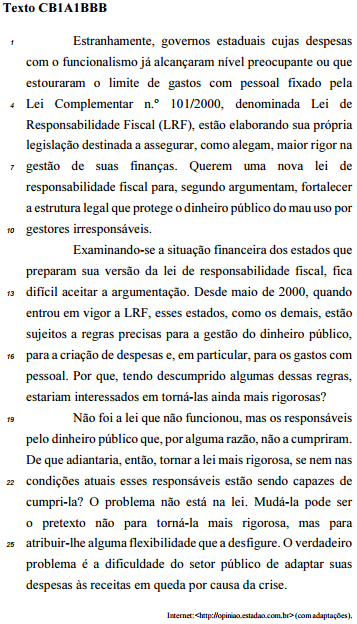
Com relação aos aspectos linguísticos do texto CB1A1BBB, julgue o seguinte item.
Os sujeitos das orações “como alegam” (l.6) e “segundo
argumentam” (l.8) são indeterminados.
A respeito das ideias do texto CB1A1BBB, julgue o item a seguir.
Segundo o texto, o objetivo de se propor uma nova lei de
responsabilidade fiscal, mais rígida quanto à proteção do
dinheiro público, é desconfigurar a LRF.
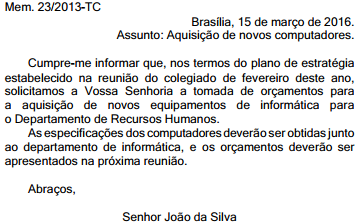
O texto ficaria mais conciso, atendendo-se às normas constantes no MRPR quanto às características da redação oficial, caso se substituísse o trecho Cumpre-me informar que por Informo que.
O emprego de Abraços como fecho do documento apresentado contraria as determinações do MRPR quanto às características da redação oficial, especialmente no que se refere à formalidade e à impessoalidade.
Com relação aos aspectos linguísticos do texto CB1A1BBB, julgue o seguinte item.
O emprego do acento grave em “às receitas” (l.27) decorre da
regência do verbo “adaptar” (l.26) e da presença do artigo
definido feminino determinando o substantivo “receitas”.
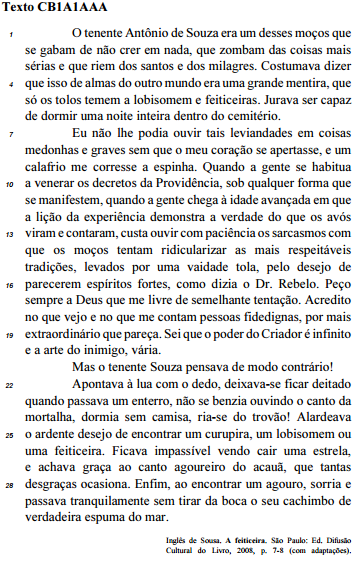
Julgue o item que se segue, referente aos aspectos linguísticos do texto CB1A1AAA.
A supressão da vírgula empregada no trecho “a arte do
inimigo, vária” (l.20) prejudicaria o sentido original do texto.
Julgue o item que se segue, referente aos aspectos linguísticos do texto CB1A1AAA.
Haveria prejuízo da correção gramatical do texto caso a
partícula “se”, no trecho “Quando a gente se habitua a venerar
os decretos da Providência” (l. 9 e 10), fosse deslocada para
imediatamente após a forma verbal “habitua”, escrevendo-se
habitua-se.
Com relação às ideias do texto CB1A1AAA, julgue o item seguinte.
A pouca idade do tenente Souza é apontada pelo narrador
como a causa principal do seu comportamento zombeteiro,
sarcástico e cheio de desdém pelas crendices populares.
Com relação às ideias do texto CB1A1AAA, julgue o item seguinte.
O tema central do texto é explorado pela perspectiva do
conflito entre a crença nas tradições religiosas populares e o
ceticismo em relação a elas.
Com relação às ideias do texto CB1A1AAA, julgue o item seguinte.
Para o narrador, as pessoas de idade avançada são pouco tolerantes para com os mais jovens e mais tolerantes em relação ao sobrenatural.

Com relação aos aspectos linguísticos do texto CB1A1BBB, julgue o seguinte item.
Na linha 13, a oração “aceitar a argumentação” funciona como
complemento do adjetivo “difícil”.
 Conheça nossos planos