Questões de Concurso
Sobre verbos modais | modal verbs em inglês
Foram encontradas 395 questões


Ano: 2014
Banca:
CETRO
Órgão:
AEB
Provas:
CETRO - 2014 - AEB - Analista em C&T - Gestão Administrativa - Pleno 1
|
CETRO - 2014 - AEB - Tecnologista - Desenvolvimento Técnológico - Pleno 1 |
Q482192
Inglês
Choose the alternative that defines, grammatically and respectively, the verbs in bold in the sentences below.
I would1 look to generate in my friends, and across my generation, a commitment to serving. Whether in schools, hospitals, or on wilderness trails, I’d hope 2 to create in each of us a new, expanded sense of citizenship. We’d spend 3 a year of our lives, before jobs, children, and mortgages complicate our options, building an America where serving is not the obligation of a few – or a possibility only to the privileged.
It would be 4 a real choice for everyone. If I were 22 I’d want to give 5 myself an answer to the question: “Where did you serve?”
I would1 look to generate in my friends, and across my generation, a commitment to serving. Whether in schools, hospitals, or on wilderness trails, I’d hope 2 to create in each of us a new, expanded sense of citizenship. We’d spend 3 a year of our lives, before jobs, children, and mortgages complicate our options, building an America where serving is not the obligation of a few – or a possibility only to the privileged.
It would be 4 a real choice for everyone. If I were 22 I’d want to give 5 myself an answer to the question: “Where did you serve?”
Q465487
Inglês
Texto associado
Read the text below and answer the questions that follow:
Teaching English as a foreign language teacher: job description
Teaching English as a foreign language (TEFL) involves teaching adults and children whose first or main language is not English. This can be done in the UK or abroad and the students may be learning English for either business or leisure reasons.
Teaching English to speakers of other languages (TESOL) is also a widely used term and often means the same thing as TEFL. It’s sometimes specifically used to refer to teaching English to people who are living in the UK but who do not speak English as a first language. These students are most commonly refugees and immigrants and need to learn the language in order to help them settle into the UK society.Their courses are often government funded.
Teaching English as a second language (TESL) or teaching English as an additional language (TEAL) may also be terms that are used but they generally all refer to the same thing - teaching English to someone whose native language is not English.
Teachers of English as a foreign language can work in a variety of settingswith different age ranges. This can include commercial language schools, schools and institutions of further and higher education throughout the UK and overseas. Some may also teach in industry, while others are self-employed. Classes are usually taught in English, evenwith beginners. Teaching English as a foreign language teacher: job description
Adapted from: < www.prospects.ac.uk/case-studies-working- abroad>
Teaching English as a foreign language teacher: job description
Teaching English as a foreign language (TEFL) involves teaching adults and children whose first or main language is not English. This can be done in the UK or abroad and the students may be learning English for either business or leisure reasons.
Teaching English to speakers of other languages (TESOL) is also a widely used term and often means the same thing as TEFL. It’s sometimes specifically used to refer to teaching English to people who are living in the UK but who do not speak English as a first language. These students are most commonly refugees and immigrants and need to learn the language in order to help them settle into the UK society.Their courses are often government funded.
Teaching English as a second language (TESL) or teaching English as an additional language (TEAL) may also be terms that are used but they generally all refer to the same thing - teaching English to someone whose native language is not English.
Teachers of English as a foreign language can work in a variety of settingswith different age ranges. This can include commercial language schools, schools and institutions of further and higher education throughout the UK and overseas. Some may also teach in industry, while others are self-employed. Classes are usually taught in English, evenwith beginners. Teaching English as a foreign language teacher: job description
Adapted from: < www.prospects.ac.uk/case-studies-working- abroad>
Read these sentences:
1. You ___________ smoke in the classroom. It’s forbidden.
2. You ___________ study hard for the final tests.
3. You smoke too much. You ___________ to quit smoking.
Choose the correct modal verbs that complete these sentences, respectively
1. You ___________ smoke in the classroom. It’s forbidden.
2. You ___________ study hard for the final tests.
3. You smoke too much. You ___________ to quit smoking.
Choose the correct modal verbs that complete these sentences, respectively
Q418805
Inglês
Texto associado
This (Illegal) American Life
By Maria E. Andreu
My parents came to New York City to make their fortune when I was a baby. Irresponsible and dreamy and in their early 20s, they didn't think things through when their visa expired; they decided to stay just a bit longer to build up a nest egg.
But our stay got progressively longer, until, when I was 6, my grandfather died in South America. My father decided my mother and I should go to the funeral and, with assurances that he would handle everything, sat me down and told me I'd have a nice visit in his boyhood home in Argentina, then be back in America in a month.
I didn't see him for two years.
We couldn't get a visa to return. My father sent us money from New Jersey, as the months of our absence stretched into years. Finally, he met someone who knew "coyotes" - people who smuggled others into the U.S. via Mexico. He paid them what they asked for, and we flew to Mexico City.
They drove us to the Mexican side of the border, and left us at a beach. Another from their operation picked us up there and drove us across as his family. We passed Disneyland on our way to the airport, where we boarded the plane to finally rejoin my father.
As a child, I had thought coming back home would be the magical end to our troubles, but in many ways it was the beginning. I chafed at the strictures of undocumented life: no social security number meant no public school (instead I attended a Catholic school my parents could scarcely afford); no driver's license, no after-school job. My parents had made their choices, and I had to live with those, seeing off my classmates as they left on a class trip to Canada, or packing to go off to college, where 1 could not go.
The year before I graduated from high school, Congress passed the amnesty law of 1987. A few months after my 18th birthday, I became legal and what had always seemed a blank future of no hope suddenly turned dazzling with possibility.
When I went for my interview at the Immigration and Naturalization Service, the caseworker looked at me quizzically when he heard me talk in unaccented English and joke about current events. Surely this American teenager did not fit in with the crowd of illegals looking to make things right.
At the time, I was flattered. His confusion meant I could pass as an American.
(Newsweek, October 2f 2008. Page 12.)
In "My father decided my mother and I should go to the funeral" the modal can be replaced by
Ano: 2014
Banca:
FUNIVERSA
Órgão:
SEAP-DF
Prova:
FUNIVERSA - 2014 - SEAP-DF - Auditor de Controle Interno - Finanças e Controle |
Q418208
Inglês

Using the above text as reference, choose the correct alternative.
The word which can replace may (line 11) without changing its meaning is
The word which can replace may (line 11) without changing its meaning is
Ano: 2014
Banca:
CESPE / CEBRASPE
Órgão:
SEDF
Prova:
CESPE / CEBRASPE - 2014 - SEDF - Estudantes Universitários |
Q417528
Inglês

Judge the following items according to the text above.
No change in meaning will occur if “need not be seen” (l.20) is replaced with must not be seen.
No change in meaning will occur if “need not be seen” (l.20) is replaced with must not be seen.
Ano: 2014
Banca:
CESGRANRIO
Órgão:
Petrobras
Prova:
CESGRANRIO - 2014 - Petrobras - Conhecimentos Básicos - Todos os Cargos de Nível Superior |
Q405572
Inglês

In Text I, the idea stated in italics corresponds to the meaning expressed by the boldfaced verb phrase in
Ano: 2014
Banca:
FUMARC
Órgão:
AL-MG
Provas:
FUMARC - 2014 - AL-MG - Analista de Sistemas - Desenvolvimento
|
FUMARC - 2014 - AL-MG - Analista de Sistemas - Administração de Rede |
Q383671
Inglês

The road sign above means that you _____ reduce speed.
Ano: 2014
Banca:
CESGRANRIO
Órgão:
FINEP
Prova:
CESGRANRIO - 2014 - FINEP - Nível Superior - Conhecimentos Básicos - Cargos 1 a 6 |
Q375262
Inglês

In the fragments of the text: “they may lose the desire to master whatever task you are asking them to do” (lines 12-13) and “then you have to do more than just present lessons in the app” (lines 18-19), the verb forms in bold express the ideas, respectively, of
Ano: 2014
Banca:
FCC
Órgão:
SEFAZ-RJ
Prova:
FCC - 2014 - SEFAZ-RJ - Auditor Fiscal da Receita Estadual - Prova 1 |
Q351448
Inglês

According to the context, the MODAL that adequately fills the blank is
Ano: 2013
Banca:
CESPE / CEBRASPE
Órgão:
SEDUC-CE
Prova:
CESPE - 2013 - SEDUC-CE - Professor Pleno I - Língua Inglesa |
Q866982
Inglês

In the clause ‘the greatest guy you could meet’ (ℓ.4), the modal verb
“could” expresses
Ano: 2013
Banca:
CESPE / CEBRASPE
Órgão:
SEDUC-CE
Prova:
CESPE - 2013 - SEDUC-CE - Professor Pleno I - Língua Inglesa |
Q866979
Inglês

In the sentence “The rainbow troops must constantly defend their
extremely poor school against plans to close it” (ℓ.15-16), the modal
verb “must” expresses
Q789413
Inglês

The modal in “They can perfectly practice” (lines 12 and 13)
implies
Ano: 2013
Banca:
CESPE / CEBRASPE
Órgão:
SERPRO
Prova:
CESPE - 2013 - SERPRO - Conhecimentos Básicos - Cargos 1, 7, a 10, 16, 18, 20 e 22 |
Q635613
Inglês
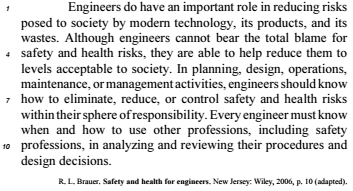
According to the text above, judge the next item.
Even though the verbs “should” (l.6) and “must” (l.8) have
different meanings, they can be used interchangeably in the
text without invalidating the author’s plea.
Q385732
Inglês
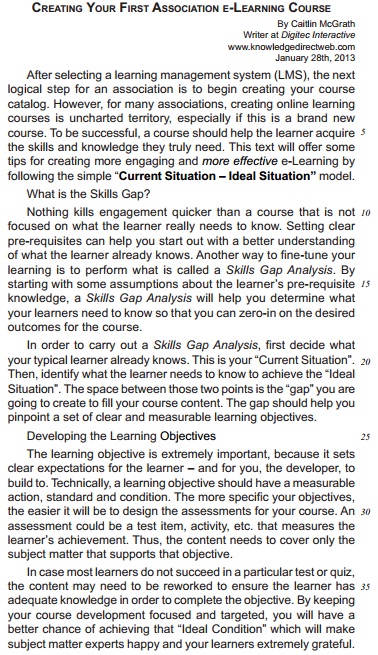
Some linguistic devices indicate the degree to which an observation is possible, probable, likely, certain, permitted, or prohibited. In English, these notions are most commonly expressed by modal auxiliaries.
The modal auxiliaries in “Setting clear pre-requisites can help you…” (L. 11-12) and “… the content may need to be reworked…” (L. 35) convey the notion of:
The modal auxiliaries in “Setting clear pre-requisites can help you…” (L. 11-12) and “… the content may need to be reworked…” (L. 35) convey the notion of:
Q332724
Inglês


Choose the correct modal verb that completes the sentence correctly.
According to the manual, you _____________ change the originalwiring.
According to the manual, you _____________ change the originalwiring.
Ano: 2013
Banca:
CESGRANRIO
Órgão:
BNDES
Provas:
CESGRANRIO - 2013 - BNDES - Nível Superior - Conhecimentos Básicos - Todos os Cargos
|
CESGRANRIO - 2013 - BNDES - Profissional Básico - Biblioteconomia |
CESGRANRIO - 2013 - BNDES - Profissional Básico - Comunicação Social |
Q301249
Inglês

The boldfaced verb form conveys the idea of strong necessity in
Ano: 2012
Banca:
Prefeitura do Rio de Janeiro - RJ
Órgão:
CDURP
Prova:
Prefeitura do Rio de Janeiro - RJ - 2012 - CDURP - Advogado Júnior |
Q1317827
Inglês
Texto associado
Read the following text and answer question based on the text
A Potential Solution: Farm Vertically
The concept of indoor farming is not new, since
hothouse production of tomatoes, a wide variety of
herbs, and other produce has been in vogue for some
time. What is new is the urgent need to scale up this
technology to accommodate another 3 billion people.
An entirely new approach to indoor farming must be
invented, employing cutting edge technologies. The
Vertical Farm must be efficient (cheap to construct and
safe to operate). Vertical farms, many stories high, will
be situated in the heart of the world’s urban centers. If
successfully implemented, they offer the promise of
urban renewal, sustainable production of a safe and
varied food supply (year-round crop production), and
the eventual repair of ecosystems that have been
sacrificed for horizontal farming.
It took humans 10,000 years to learn how to grow
most of the crops we now take for granted. Along the
way, we despoiled most of the land we worked, often
turning verdant, natural ecozones into semi-arid deserts.
Within that same time frame, we evolved into an urban
species, in which 60% of the human population now
lives vertically in cities. This means that, for the majority,
we humans are protected against the elements, yet we
subject our food-bearing plants to the rigors of the great
outdoors and can do no more than hope for a good
weather year. However, more often than not now, due to
a rapidly changing climate regime, that is not what
follows. Massive floods, protracted droughts, class 4-5
hurricanes, and severe monsoons take their toll each
year, destroying millions of tons of valuable crops. Don’t
our harvestable plants deserve the same level of comfort
and protection that we now enjoy? The time is at hand
for us to learn how to safely grow our food inside
environmentally controlled multistory buildings within
urban centers. If we do not, then in just another 50
years, the next 3 billion people will surely go hungry,
and the world will become a much more unpleasant
place in which to live.
(taken from http://www.verticalfarm.com/more)
In the sentence “Vertical Farm must be efficient…”
(paragraph 1) the modal “must” indicates:
Ano: 2012
Banca:
RBO
Órgão:
Prefeitura de Porto Ferreira - SP
Prova:
RBO - 2012 - Prefeitura de Porto Ferreira - SP - Professor de Educação Básica II - Inglês |
Q1203569
Inglês
Use the correct modal verb in the sentence below and pick up an alternative:
“ Yes! You _______ leave the room now!”
Ano: 2012
Banca:
CESGRANRIO
Órgão:
Petrobras
Provas:
CESGRANRIO - 2012 - BR Distribuidora - Profissional Júnior - Formação Administração
|
CESGRANRIO - 2012 - BR Distribuidora - Profissional Júnior - Formação Engenharia Mecânica |
CESGRANRIO - 2012 - BR Distribuidora - Profissional Júnior - Formação Ciências Contábeis |
CESGRANRIO - 2012 - BR Distribuidora - Profissional Júnior - Formação Analista de Sistemas - Ênfase em Java - Crm e Web |
Q460779
Inglês

The sentence in which the boldfaced item expresses an advice is
Ano: 2012
Banca:
EXATUS
Órgão:
DETRAN-RJ
Prova:
EXATUS - 2012 - DETRAN-RJ - Todos os Cargos - Conhecimentos Gerais |
Q317100
Inglês
Choose the alternative that shows the correct form to use the Conditional:
Andrew is able to understand his France teacher, therefore he _____ answer his questions.
Andrew is able to understand his France teacher, therefore he _____ answer his questions.

 Conheça nossos planos