Questões de Concurso Sobre inglês
Foram encontradas 26.310 questões


Read the text about a tribute to Franz Kafka for the question
Google Doodle celebrates Franz Kafka’s 130th birthday with ‘The Metamorphosis’ tribute Google has created a ‘doodle’ in tribute to Franz Kafka on the 130th anniversary of the Germanlanguage novelist’s birth.
The doodle is based on Kafka’s 1915 novella ‘The Metamorphosis’ – considered by many to be one of the most important works of fiction of the 20th Century – and shows the character Gregor Samsa walking into a room in the guise of a large insect.
In the much-celebrated work, Samsa is a travelling salesman who transforms into an insect overnight. The rest of novella focuses on his struggle to come to terms with his new existence and the burden it places on his family.
Kafka was born into an Ashkenazi Jewish family on 3 July 1883 in Prague, which was then part of the Austro-Hungarian Empire.
He originally trained as a lawyer but began writing short stories in his spare time - eventually coming to consider it his calling – despite only a handful of his works being published during his lifetime.
Regarded as one of the 20th Century’s most influential authors, Kafka’s works are dominated by unreliable narrators who often tell dark tales of existentialist difficulties.
Kafka’s notoriously difficult relationship with his father Hermann is believed to have strongly influenced his work – with The Metamorphosis itself thought to be based upon Kafka’s own fears of insignificance and repulsiveness to his own family.
From: HALL, John. Available at:<http://www.independent.co.uk/life-style/gadgets-and-tech/news/google-doodlecelebrates-franz-kafkas-130th-birthday-with-the-metamorphosis-tribute-8685557.html>.
Read the text about a tribute to Franz Kafka for the question
Google Doodle celebrates Franz Kafka’s 130th birthday with ‘The Metamorphosis’ tribute Google has created a ‘doodle’ in tribute to Franz Kafka on the 130th anniversary of the Germanlanguage novelist’s birth.
The doodle is based on Kafka’s 1915 novella ‘The Metamorphosis’ – considered by many to be one of the most important works of fiction of the 20th Century – and shows the character Gregor Samsa walking into a room in the guise of a large insect.
In the much-celebrated work, Samsa is a travelling salesman who transforms into an insect overnight. The rest of novella focuses on his struggle to come to terms with his new existence and the burden it places on his family.
Kafka was born into an Ashkenazi Jewish family on 3 July 1883 in Prague, which was then part of the Austro-Hungarian Empire.
He originally trained as a lawyer but began writing short stories in his spare time - eventually coming to consider it his calling – despite only a handful of his works being published during his lifetime.
Regarded as one of the 20th Century’s most influential authors, Kafka’s works are dominated by unreliable narrators who often tell dark tales of existentialist difficulties.
Kafka’s notoriously difficult relationship with his father Hermann is believed to have strongly influenced his work – with The Metamorphosis itself thought to be based upon Kafka’s own fears of insignificance and repulsiveness to his own family.
From: HALL, John. Available at:<http://www.independent.co.uk/life-style/gadgets-and-tech/news/google-doodlecelebrates-franz-kafkas-130th-birthday-with-the-metamorphosis-tribute-8685557.html>.
Read the text about a tribute to Franz Kafka for the question
Google Doodle celebrates Franz Kafka’s 130th birthday with ‘The Metamorphosis’ tribute Google has created a ‘doodle’ in tribute to Franz Kafka on the 130th anniversary of the Germanlanguage novelist’s birth.
The doodle is based on Kafka’s 1915 novella ‘The Metamorphosis’ – considered by many to be one of the most important works of fiction of the 20th Century – and shows the character Gregor Samsa walking into a room in the guise of a large insect.
In the much-celebrated work, Samsa is a travelling salesman who transforms into an insect overnight. The rest of novella focuses on his struggle to come to terms with his new existence and the burden it places on his family.
Kafka was born into an Ashkenazi Jewish family on 3 July 1883 in Prague, which was then part of the Austro-Hungarian Empire.
He originally trained as a lawyer but began writing short stories in his spare time - eventually coming to consider it his calling – despite only a handful of his works being published during his lifetime.
Regarded as one of the 20th Century’s most influential authors, Kafka’s works are dominated by unreliable narrators who often tell dark tales of existentialist difficulties.
Kafka’s notoriously difficult relationship with his father Hermann is believed to have strongly influenced his work – with The Metamorphosis itself thought to be based upon Kafka’s own fears of insignificance and repulsiveness to his own family.
From: HALL, John. Available at:<http://www.independent.co.uk/life-style/gadgets-and-tech/news/google-doodlecelebrates-franz-kafkas-130th-birthday-with-the-metamorphosis-tribute-8685557.html>.
Read the text about a tribute to Franz Kafka for the question
Google Doodle celebrates Franz Kafka’s 130th birthday with ‘The Metamorphosis’ tribute Google has created a ‘doodle’ in tribute to Franz Kafka on the 130th anniversary of the Germanlanguage novelist’s birth.
The doodle is based on Kafka’s 1915 novella ‘The Metamorphosis’ – considered by many to be one of the most important works of fiction of the 20th Century – and shows the character Gregor Samsa walking into a room in the guise of a large insect.
In the much-celebrated work, Samsa is a travelling salesman who transforms into an insect overnight. The rest of novella focuses on his struggle to come to terms with his new existence and the burden it places on his family.
Kafka was born into an Ashkenazi Jewish family on 3 July 1883 in Prague, which was then part of the Austro-Hungarian Empire.
He originally trained as a lawyer but began writing short stories in his spare time - eventually coming to consider it his calling – despite only a handful of his works being published during his lifetime.
Regarded as one of the 20th Century’s most influential authors, Kafka’s works are dominated by unreliable narrators who often tell dark tales of existentialist difficulties.
Kafka’s notoriously difficult relationship with his father Hermann is believed to have strongly influenced his work – with The Metamorphosis itself thought to be based upon Kafka’s own fears of insignificance and repulsiveness to his own family.
From: HALL, John. Available at:<http://www.independent.co.uk/life-style/gadgets-and-tech/news/google-doodlecelebrates-franz-kafkas-130th-birthday-with-the-metamorphosis-tribute-8685557.html>.
Read the text about Nobel Prize for the question.
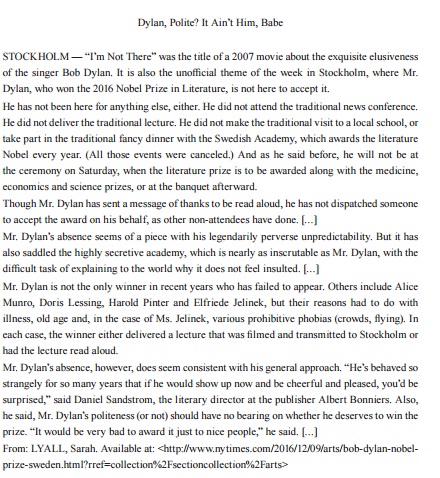
Read the text about Nobel Prize for the question.
Read the text about Nobel Prize for the question.
Read the text about Nobel Prize for the question.
Read the text about Nobel Prize for the question.
Based on the article, it is correct to affirm that the pronouns “it” (l.2), “it” (l.14), and “he” (l.23), RESPECTIVELY, refer to:
Read TEXT and answer question.
TEXT
CASE STUDY ON THE IMPLEMENTATION OF REVERSE LOGISTICS PRACTICES IN A COMPANY PRODUCING HYGIENE PRODUCTS
Currently, it is necessary for companies to understand both distribution logistics processes and those involving reverse logistics, which is characterized by the treatment and final destination of post-consumption and post-sale products. The implementation of the reverse logistics features propelling forces and restrictive forces that assist and inhibit, respectively, its implementation. The objective of this paper is to study the propelling and restrictive forces of reverse logistics and to identify through a case study of a company producing hygiene products whether reverse logistics practices are applied, and in what form. In addition, we sought to identify the existence of specific performance indicators. It was found that the company considers reverse logistics a strategic issue and that, despite the existence of few performance indicators related to this topic, waste generation was reduced from 10% to 7% on the production volume, indicating that materials were being reused.
(ANDRADE, R. P.; VIEIRA JR., M.; VANALLE, R. M. Estudo de caso sobre a implementação das
práticas de logística reversa em uma empresa de produtos de higiene. Exacta – EP, São Paulo, v. 11, n.
2, p. 13-22, 2013. Disponível em:
Read TEXT and answer question.
TEXT
CASE STUDY ON THE IMPLEMENTATION OF REVERSE LOGISTICS PRACTICES IN A COMPANY PRODUCING HYGIENE PRODUCTS
Currently, it is necessary for companies to understand both distribution logistics processes and those involving reverse logistics, which is characterized by the treatment and final destination of post-consumption and post-sale products. The implementation of the reverse logistics features propelling forces and restrictive forces that assist and inhibit, respectively, its implementation. The objective of this paper is to study the propelling and restrictive forces of reverse logistics and to identify through a case study of a company producing hygiene products whether reverse logistics practices are applied, and in what form. In addition, we sought to identify the existence of specific performance indicators. It was found that the company considers reverse logistics a strategic issue and that, despite the existence of few performance indicators related to this topic, waste generation was reduced from 10% to 7% on the production volume, indicating that materials were being reused.
(ANDRADE, R. P.; VIEIRA JR., M.; VANALLE, R. M. Estudo de caso sobre a implementação das
práticas de logística reversa em uma empresa de produtos de higiene. Exacta – EP, São Paulo, v. 11, n.
2, p. 13-22, 2013. Disponível em:
Read TEXT and answer question.
TEXT
CASE STUDY ON THE IMPLEMENTATION OF REVERSE LOGISTICS PRACTICES IN A COMPANY PRODUCING HYGIENE PRODUCTS
Currently, it is necessary for companies to understand both distribution logistics processes and those involving reverse logistics, which is characterized by the treatment and final destination of post-consumption and post-sale products. The implementation of the reverse logistics features propelling forces and restrictive forces that assist and inhibit, respectively, its implementation. The objective of this paper is to study the propelling and restrictive forces of reverse logistics and to identify through a case study of a company producing hygiene products whether reverse logistics practices are applied, and in what form. In addition, we sought to identify the existence of specific performance indicators. It was found that the company considers reverse logistics a strategic issue and that, despite the existence of few performance indicators related to this topic, waste generation was reduced from 10% to 7% on the production volume, indicating that materials were being reused.
(ANDRADE, R. P.; VIEIRA JR., M.; VANALLE, R. M. Estudo de caso sobre a implementação das
práticas de logística reversa em uma empresa de produtos de higiene. Exacta – EP, São Paulo, v. 11, n.
2, p. 13-22, 2013. Disponível em:

 Conheça nossos planos