Questões de Concurso
Sobre orações condicionais | conditional clauses em inglês
Foram encontradas 305 questões


Which of the explanations at the end of the sentence is incorrect:
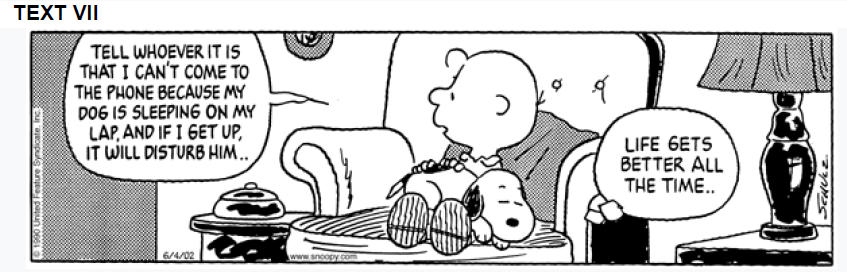
Based on the comic, analyze the words and the expressions: “WHOEVER”; … “CAN’T COME”; “MY DOG IS SLEEPING”; “… AND IF I GET UP...”
Choose the RIGHT alternative regarding the highlighted words above.
Off to 'big school'? Some pupils need extra support, says Ofsted
Primary schools should identify pupils whose behaviour may be at risk of deteriorating when they reach secondary school, a report for Ofsted suggests. Head teachers told Ofsted some pupils could struggle more than others with the move to "big school" and might benefit from extra support. This could be offered to help minimise the risk of such pupils misbehaving when they arrive, they said. It comes as thousands of pupils have just started secondary school. England's education watchdog, Ofsted, has announced a new push on behaviour management for teachers.
Ofsted says it will be adopting a new focus on behaviour management when it inspects teacher training providers. Its aim is to ensure that teachers are well trained in principles of behaviour management, so that all pupils can be offered quality education. Poor behaviour is increasingly seen as a communication of need, rather than a child simply being badly behaved.
Ofsted chief inspector Amanda Spielman said: "Positive behaviour needs to be taught as early on as possible, and expectations raised as children get older. “For some pupils, going from a relatively small primary community, where you're known by everyone and where you have a close relationship with a small number of teachers, to a much larger secondary school with several teachers, will be particularly challenging," she added. "The schools in our sample felt that it was important to identify pupils who were particularly at risk well before they started secondary school, so that they could provide appropriate support and prepare them for life in the 'big school'. "
The aim is to prevent pupils from falling behind as they struggle with the transition, which head teachers said could lead to a SPIKE in challenging behaviour. But the report was keen to point out that early identification of potential issues should not result in secondary schools discouraging entries from certain pupils. Ms Spielman is clear that good behaviour benefits everyone, by providing a positive setting for learning.
( hdttps://www.bbc.com/news/education-49661576 )
Complete the sentences with the correct form of the verbs to fit the conditional clauses:
I. If Lina _____ hungry, she would have come with us to the restaurant.
II. If he had lived in Italy, he _______ how to speak Italian.
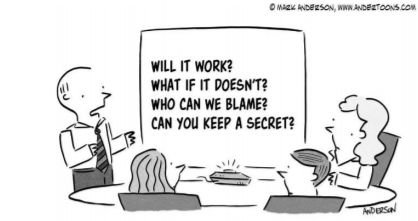
If you ___ the way, I _____ you up.
“If I don’t practice a lot, I won’t win the championship.”
“If the police were to catch him, he’d spend at least five years in prison.”

“If an embarrassing image escaped onto the web, it would be there forever”.
I. It is in the first conditional. II. It refers to a time that is in the past and a situation that is contrary to reality. III. The if-clause uses simple past; while the main clause uses the present perfect.
Which ones are INCORRECT?
Instructions: answer the question based on the following text.

Source: https://www.independent.co.uk/life-style/ikigai-hygge-lagom-swedish-danish-japaneses-candinavian-lifestyle-happiness-meaning-of-life-a7956141.html
I. It is an example of the zero conditional. II. It is used to talk about imaginary situations in the past. III. The third conditional would be "If you had increased the daily time at flow you would increase your connection with your ikigai".
Which ones are INCORRECT?
What alternative best completes the following sentence?
f we had gone to Fortaleza, we ______ the sea.
“If there were more buses, we would leave the car at home.”

Chinua Achebe. The african writer and the english language. In: Patrick
Williams & Laura Cristman. Colonial discourse and postcolonial theory.
New York: Columbia University Press, 1994, p. 428-9 (adapted).
A respeito do vocabulário e dos aspectos linguísticos do texto 7A2-I, julgue o item seguinte.
In the text, “If” (ℓ.15) introduces a conditional clause.
“Do you have another bottle of water in your bag?”
“No, if you had asked me earlier, I ______ you one.”
 Conheça nossos planos