Questões de Concurso Público CIJUN - SP 2023 para Técnico de TI Junior (Infraestrutura)
Foram encontradas 50 questões


Se as motivações são muitas, então a execução do projeto avança e não para.
Assinale a alternativa que apresenta uma negação lógica dessa afirmação.
10201, 11311, 12421, 13531, 14641, 15751, 16861, 17971, 181081, 191191, 11012101, 11113111, 11214121, ...
Essa sequência foi criada com um padrão lógico e é ilimitada. Nessa sequência, a soma do 20o termo com o 23o termo é igual a
Com essas informações, é logicamente verdade que
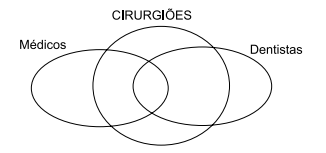 A partir das informações fornecidas no diagrama, é logicamente verdadeiro afirmar que
 Leia o texto a seguir para responder a questão.
What is the difference between access point and router?
The router acts as a hub that sets up a local area network and manages all of the devices and communication in it. An access point, on the other hand, is a sub-device within the local area network that provides another location for devices to connect from and enables more devices to be on the network.
Wireless routers can function as access points, but not all access points can work as routers. While routers manage local area networks, communicate with outside network systems, acquire, distribute, and dispatch data in multiple directions, establish a point of connectivity, and ensure security, access points typically only provide access to the router’s established network.
(www.ligowave.com/difference-between-access-point-and-
-router#:~:text=Main%20Differences.&text=While%20routers%20manage%20local%20area,to%20the%20router%27s%20established%20network.
Adaptado)
Leia o texto a seguir para responder a questão.
What is the difference between access point and router?
The router acts as a hub that sets up a local area network and manages all of the devices and communication in it. An access point, on the other hand, is a sub-device within the local area network that provides another location for devices to connect from and enables more devices to be on the network.
Wireless routers can function as access points, but not all access points can work as routers. While routers manage local area networks, communicate with outside network systems, acquire, distribute, and dispatch data in multiple directions, establish a point of connectivity, and ensure security, access points typically only provide access to the router’s established network.
(www.ligowave.com/difference-between-access-point-and-
-router#:~:text=Main%20Differences.&text=While%20routers%20manage%20local%20area,to%20the%20router%27s%20established%20network.
Adaptado)
Leia o texto a seguir para responder a questão.
What is the difference between access point and router?
The router acts as a hub that sets up a local area network and manages all of the devices and communication in it. An access point, on the other hand, is a sub-device within the local area network that provides another location for devices to connect from and enables more devices to be on the network.
Wireless routers can function as access points, but not all access points can work as routers. While routers manage local area networks, communicate with outside network systems, acquire, distribute, and dispatch data in multiple directions, establish a point of connectivity, and ensure security, access points typically only provide access to the router’s established network.
(www.ligowave.com/difference-between-access-point-and-
-router#:~:text=Main%20Differences.&text=While%20routers%20manage%20local%20area,to%20the%20router%27s%20established%20network.
Adaptado)
Leia o texto a seguir para responder a questão.
What is the difference between access point and router?
The router acts as a hub that sets up a local area network and manages all of the devices and communication in it. An access point, on the other hand, is a sub-device within the local area network that provides another location for devices to connect from and enables more devices to be on the network.
Wireless routers can function as access points, but not all access points can work as routers. While routers manage local area networks, communicate with outside network systems, acquire, distribute, and dispatch data in multiple directions, establish a point of connectivity, and ensure security, access points typically only provide access to the router’s established network.
(www.ligowave.com/difference-between-access-point-and-
-router#:~:text=Main%20Differences.&text=While%20routers%20manage%20local%20area,to%20the%20router%27s%20established%20network.
Adaptado)
Leia o texto a seguir para responder a questão.
What is the difference between access point and router?
The router acts as a hub that sets up a local area network and manages all of the devices and communication in it. An access point, on the other hand, is a sub-device within the local area network that provides another location for devices to connect from and enables more devices to be on the network.
Wireless routers can function as access points, but not all access points can work as routers. While routers manage local area networks, communicate with outside network systems, acquire, distribute, and dispatch data in multiple directions, establish a point of connectivity, and ensure security, access points typically only provide access to the router’s established network.
(www.ligowave.com/difference-between-access-point-and-
-router#:~:text=Main%20Differences.&text=While%20routers%20manage%20local%20area,to%20the%20router%27s%20established%20network.
Adaptado)
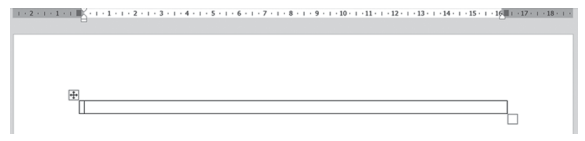
Um usuário executou as seguintes ações:
I. Clicou no ícone de alinhamento à direita, digitou a palavra Jundiaí e pressionou TAB.
II. Clicou no ícone de alinhamento à esquerda, digitou a palavra Jundiaí e pressionou TAB.
III. Clicou no ícone de alinhamento centralizado, digitou a palavra Jundiaí e pressionou TAB.
IV. Clicou no ícone de alinhamento justificado, digitou a palavra Jundiaí e pressionou TAB.
V. Clicou no ícone de alinhamento à direita e digitou a palavra Jundiaí.
Assinale a alternativa que indica em quais linhas da tabela o alinhamento está à direita.
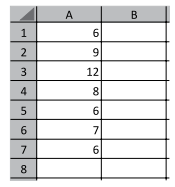 Assinale a alternativa que apresenta o resultado da função =CONT.SE(A1:A7;MENOR(A1:A7;1)), a ser inserida na célula A8.
 I. Pressionou F5 para iniciar o Modo de Apresentação.
II. Pressionou ENTER.
III. Clicou no botão de ação.
IV. Pressionou ENTER.
V. Pressionou Seta para Cima.
Assinale a alternativa que apresenta a sequência dos slides no Modo de Apresentação.
– o número de bits que podem ser transmitidos pela rede em certo período de tempo;
– o tempo gasto para uma mensagem atravessar de uma extremidade da rede a outra.
Esses indicadores são normalmente denominados, respectivamente:

 Conheça nossos planos