Questões de Concurso Sobre inglês
Foram encontradas 26.340 questões


Ano: 2014
Banca:
FCC
Órgão:
METRÔ-SP
Provas:
FCC - 2014 - METRÔ-SP - Analista Desenvolvimento Gestão Júnior - Administração de Empresas
|
FCC - 2014 - METRÔ-SP - Analista Desenvolvimento Gestão Júnior - Ciências Contábeis |
FCC - 2014 - METRÔ-SP - Advogado Júnior |
FCC - 2014 - METRÔ-SP - Engenheiro Júnior - Mecânica |
FCC - 2014 - METRÔ-SP - Analista Desenvolvimento Gestão Júnior - Economia |
Q407616
Inglês
Texto associado
San Francisco Subway TBMs Dig Deep to Overcome Tunnel Challenges
September 4, 2013
By Greg Aragon
Tunneling 100 ft below a busy city with varying substructure is a delicate job, especially when the work comes .....A.... 8 ft of existing tunnels. Such is the case on San Francisco's new $1.5-billion Central Subway Project, which began major subterranean excavation last month.
"The tunnels pass through both soft ground and Franciscan formation, which is heterogeneous rock that is not predictable except in its unpredictability," says Sarah Wilson, a San Francisco Municipal Transportation Agency (SFMTA) resident engineer.
While underground conditions will be tricky, the project's twin earth-pressure-balance tunnel-boring machines will be able to adjust their blades and cut through any sand, dirt or rock, says Wilson. The TBMs, dubbed Mom Chung and Big Alma, are each 350 ft long and weigh 750 tons.
Mom Chung was first out of the 450-ft-long launch box. Over the next 10 months, she will travel north, creating a 1.7-mile-long tunnel. Big Alma will begin digging a southbound parallel tunnel later this month.
The tunnels are the main component of the Central Subway Project, which is extending the Muni Metro T Third Line through one of the most densely populated neighborhoods in the U.S. with three new underground stations and one at street level. Work on the line is scheduled to wrap up in 2019.
To prevent and control ground and adjacent structure settlement, the team will use compensation grouting, in which a horizontal array of grout pipes is installed into a shaft drilled down next to the tunnel alignment. "We are basically preconditioning the ground and making it homogeneous so that there are no surprises for the crossing," says John Funghi, SFMTA program director.
September 4, 2013
By Greg Aragon
Tunneling 100 ft below a busy city with varying substructure is a delicate job, especially when the work comes .....A.... 8 ft of existing tunnels. Such is the case on San Francisco's new $1.5-billion Central Subway Project, which began major subterranean excavation last month.
"The tunnels pass through both soft ground and Franciscan formation, which is heterogeneous rock that is not predictable except in its unpredictability," says Sarah Wilson, a San Francisco Municipal Transportation Agency (SFMTA) resident engineer.
While underground conditions will be tricky, the project's twin earth-pressure-balance tunnel-boring machines will be able to adjust their blades and cut through any sand, dirt or rock, says Wilson. The TBMs, dubbed Mom Chung and Big Alma, are each 350 ft long and weigh 750 tons.
Mom Chung was first out of the 450-ft-long launch box. Over the next 10 months, she will travel north, creating a 1.7-mile-long tunnel. Big Alma will begin digging a southbound parallel tunnel later this month.
The tunnels are the main component of the Central Subway Project, which is extending the Muni Metro T Third Line through one of the most densely populated neighborhoods in the U.S. with three new underground stations and one at street level. Work on the line is scheduled to wrap up in 2019.
To prevent and control ground and adjacent structure settlement, the team will use compensation grouting, in which a horizontal array of grout pipes is installed into a shaft drilled down next to the tunnel alignment. "We are basically preconditioning the ground and making it homogeneous so that there are no surprises for the crossing," says John Funghi, SFMTA program director.
Segundo Wilson,
Ano: 2014
Banca:
FCC
Órgão:
METRÔ-SP
Provas:
FCC - 2014 - METRÔ-SP - Analista Desenvolvimento Gestão Júnior - Administração de Empresas
|
FCC - 2014 - METRÔ-SP - Analista Desenvolvimento Gestão Júnior - Ciências Contábeis |
FCC - 2014 - METRÔ-SP - Advogado Júnior |
FCC - 2014 - METRÔ-SP - Engenheiro Júnior - Mecânica |
FCC - 2014 - METRÔ-SP - Analista Desenvolvimento Gestão Júnior - Economia |
Q407615
Inglês
Texto associado
San Francisco Subway TBMs Dig Deep to Overcome Tunnel Challenges
September 4, 2013
By Greg Aragon
Tunneling 100 ft below a busy city with varying substructure is a delicate job, especially when the work comes .....A.... 8 ft of existing tunnels. Such is the case on San Francisco's new $1.5-billion Central Subway Project, which began major subterranean excavation last month.
"The tunnels pass through both soft ground and Franciscan formation, which is heterogeneous rock that is not predictable except in its unpredictability," says Sarah Wilson, a San Francisco Municipal Transportation Agency (SFMTA) resident engineer.
While underground conditions will be tricky, the project's twin earth-pressure-balance tunnel-boring machines will be able to adjust their blades and cut through any sand, dirt or rock, says Wilson. The TBMs, dubbed Mom Chung and Big Alma, are each 350 ft long and weigh 750 tons.
Mom Chung was first out of the 450-ft-long launch box. Over the next 10 months, she will travel north, creating a 1.7-mile-long tunnel. Big Alma will begin digging a southbound parallel tunnel later this month.
The tunnels are the main component of the Central Subway Project, which is extending the Muni Metro T Third Line through one of the most densely populated neighborhoods in the U.S. with three new underground stations and one at street level. Work on the line is scheduled to wrap up in 2019.
To prevent and control ground and adjacent structure settlement, the team will use compensation grouting, in which a horizontal array of grout pipes is installed into a shaft drilled down next to the tunnel alignment. "We are basically preconditioning the ground and making it homogeneous so that there are no surprises for the crossing," says John Funghi, SFMTA program director.
September 4, 2013
By Greg Aragon
Tunneling 100 ft below a busy city with varying substructure is a delicate job, especially when the work comes .....A.... 8 ft of existing tunnels. Such is the case on San Francisco's new $1.5-billion Central Subway Project, which began major subterranean excavation last month.
"The tunnels pass through both soft ground and Franciscan formation, which is heterogeneous rock that is not predictable except in its unpredictability," says Sarah Wilson, a San Francisco Municipal Transportation Agency (SFMTA) resident engineer.
While underground conditions will be tricky, the project's twin earth-pressure-balance tunnel-boring machines will be able to adjust their blades and cut through any sand, dirt or rock, says Wilson. The TBMs, dubbed Mom Chung and Big Alma, are each 350 ft long and weigh 750 tons.
Mom Chung was first out of the 450-ft-long launch box. Over the next 10 months, she will travel north, creating a 1.7-mile-long tunnel. Big Alma will begin digging a southbound parallel tunnel later this month.
The tunnels are the main component of the Central Subway Project, which is extending the Muni Metro T Third Line through one of the most densely populated neighborhoods in the U.S. with three new underground stations and one at street level. Work on the line is scheduled to wrap up in 2019.
To prevent and control ground and adjacent structure settlement, the team will use compensation grouting, in which a horizontal array of grout pipes is installed into a shaft drilled down next to the tunnel alignment. "We are basically preconditioning the ground and making it homogeneous so that there are no surprises for the crossing," says John Funghi, SFMTA program director.
A palavra que preenche corretamente a lacuna ...A... é :
Ano: 2014
Banca:
VUNESP
Órgão:
DESENVOLVE-SP
Prova:
VUNESP - 2014 - DESENVOLVESP - Analista - Grupo 6 |
Q405867
Inglês
Texto associado
Databases are increasingly used by applications and along with the data explosion, this had led to a proliferation of databases and additional complexity for database administrators (DBAs) as they try to manage the growing numbers of databases created by application developers. This increase in applications and SQL Server instances, combined with low-cost/high-storage hardware, has led to server sprawl across the organization with hundreds of servers at less than 2Gb utilization.
Application and multi-server management provides the DBA with the tools necessary to gain centralized insights into instance and database application utilization as well as a better way to develop, deploy, and manage data-tier applications.
(Extraído e adaptado de: http://technet.microsoft.com/ en-us/sqlserver/bb671430.aspx,
SQL Server 2008 R2, Application and Multi-Server Management)
Application and multi-server management provides the DBA with the tools necessary to gain centralized insights into instance and database application utilization as well as a better way to develop, deploy, and manage data-tier applications.
(Extraído e adaptado de: http://technet.microsoft.com/ en-us/sqlserver/bb671430.aspx,
SQL Server 2008 R2, Application and Multi-Server Management)
No contexto, o trecho “… a better way to develop, deploy, and manage data-tier applications” pode ser traduzido, mantendo-se o sentido, para:
Ano: 2014
Banca:
VUNESP
Órgão:
DESENVOLVE-SP
Prova:
VUNESP - 2014 - DESENVOLVESP - Analista - Grupo 6 |
Q405866
Inglês
Texto associado
Databases are increasingly used by applications and along with the data explosion, this had led to a proliferation of databases and additional complexity for database administrators (DBAs) as they try to manage the growing numbers of databases created by application developers. This increase in applications and SQL Server instances, combined with low-cost/high-storage hardware, has led to server sprawl across the organization with hundreds of servers at less than 2Gb utilization.
Application and multi-server management provides the DBA with the tools necessary to gain centralized insights into instance and database application utilization as well as a better way to develop, deploy, and manage data-tier applications.
(Extraído e adaptado de: http://technet.microsoft.com/ en-us/sqlserver/bb671430.aspx,
SQL Server 2008 R2, Application and Multi-Server Management)
Application and multi-server management provides the DBA with the tools necessary to gain centralized insights into instance and database application utilization as well as a better way to develop, deploy, and manage data-tier applications.
(Extraído e adaptado de: http://technet.microsoft.com/ en-us/sqlserver/bb671430.aspx,
SQL Server 2008 R2, Application and Multi-Server Management)
O texto informa que uma consequência do aumento de aplicações que utilizam banco de dados e da existência de hardware com baixo custo e alta capacidade de armazenamento foi
Ano: 2014
Banca:
VUNESP
Órgão:
DESENVOLVE-SP
Prova:
VUNESP - 2014 - DESENVOLVESP - Analista - Grupo 6 |
Q405865
Inglês
Texto associado
[…]
For mobile computers and telephones, cellular radio is the up-and-coming technology. GSM, CDPD, and CDMA are widely used.
The IEEE 802 LANs are: CSMA/CD, token bus, and token ring. Each of these has its own unique advantages and disadvantages, and each has found its own user community and will probably continue to serve that community for years to come. Convergence to a single LAN standard is an unlikely event. A new addition to this family is DQDB, being sold as a MAN in many cities.
An organization with multiple LANs often connects them with bridges. When a bridge connects two or more different kinds of LANs, new problems arise, some of them insoluble.
[…]
(Extraído de: Computer Networks, A.S. Tanenbaum, 3rd Edition, Prentice-Hall, pg. 335)
For mobile computers and telephones, cellular radio is the up-and-coming technology. GSM, CDPD, and CDMA are widely used.
The IEEE 802 LANs are: CSMA/CD, token bus, and token ring. Each of these has its own unique advantages and disadvantages, and each has found its own user community and will probably continue to serve that community for years to come. Convergence to a single LAN standard is an unlikely event. A new addition to this family is DQDB, being sold as a MAN in many cities.
An organization with multiple LANs often connects them with bridges. When a bridge connects two or more different kinds of LANs, new problems arise, some of them insoluble.
[…]
(Extraído de: Computer Networks, A.S. Tanenbaum, 3rd Edition, Prentice-Hall, pg. 335)
Considerando o contexto, o termo grifado em “… new problems arise…” pode ser traduzido como:
Ano: 2014
Banca:
VUNESP
Órgão:
DESENVOLVE-SP
Prova:
VUNESP - 2014 - DESENVOLVESP - Analista - Grupo 6 |
Q405864
Inglês
Texto associado
[…]
For mobile computers and telephones, cellular radio is the up-and-coming technology. GSM, CDPD, and CDMA are widely used.
The IEEE 802 LANs are: CSMA/CD, token bus, and token ring. Each of these has its own unique advantages and disadvantages, and each has found its own user community and will probably continue to serve that community for years to come. Convergence to a single LAN standard is an unlikely event. A new addition to this family is DQDB, being sold as a MAN in many cities.
An organization with multiple LANs often connects them with bridges. When a bridge connects two or more different kinds of LANs, new problems arise, some of them insoluble.
[…]
(Extraído de: Computer Networks, A.S. Tanenbaum, 3rd Edition, Prentice-Hall, pg. 335)
For mobile computers and telephones, cellular radio is the up-and-coming technology. GSM, CDPD, and CDMA are widely used.
The IEEE 802 LANs are: CSMA/CD, token bus, and token ring. Each of these has its own unique advantages and disadvantages, and each has found its own user community and will probably continue to serve that community for years to come. Convergence to a single LAN standard is an unlikely event. A new addition to this family is DQDB, being sold as a MAN in many cities.
An organization with multiple LANs often connects them with bridges. When a bridge connects two or more different kinds of LANs, new problems arise, some of them insoluble.
[…]
(Extraído de: Computer Networks, A.S. Tanenbaum, 3rd Edition, Prentice-Hall, pg. 335)
De acordo com o texto, CSMA/CD, token bus e token ring são LANs padrão IEEE 802 que
Ano: 2014
Banca:
CESGRANRIO
Órgão:
Petrobras
Prova:
CESGRANRIO - 2014 - Petrobras - Conhecimentos Básicos - Todos os Cargos de Nível Superior |
Q405578
Inglês

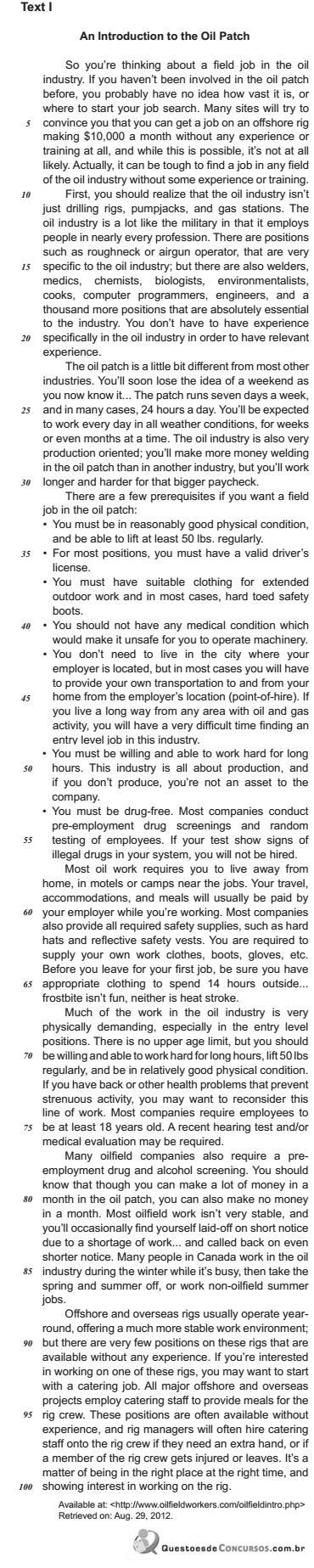
A comparison between Texts I and II reveals that
Ano: 2014
Banca:
CESGRANRIO
Órgão:
Petrobras
Prova:
CESGRANRIO - 2014 - Petrobras - Conhecimentos Básicos - Todos os Cargos de Nível Superior |
Q405577
Inglês
Concerning the future of the oil job market, Text II suggests that
Ano: 2014
Banca:
CESGRANRIO
Órgão:
Petrobras
Prova:
CESGRANRIO - 2014 - Petrobras - Conhecimentos Básicos - Todos os Cargos de Nível Superior |
Q405576
Inglês
The main intention of Text II is to discuss the
Ano: 2014
Banca:
CESGRANRIO
Órgão:
Petrobras
Prova:
CESGRANRIO - 2014 - Petrobras - Conhecimentos Básicos - Todos os Cargos de Nível Superior |
Q405575
Inglês

In the fragment “The oil industry is a lot like the military in that it employs people in nearly every profession.” (lines 11-13) the expression in that can be replaced, without changing the meaning of the sentence, by
Ano: 2014
Banca:
CESGRANRIO
Órgão:
Petrobras
Prova:
CESGRANRIO - 2014 - Petrobras - Conhecimentos Básicos - Todos os Cargos de Nível Superior |
Q405574
Inglês
The fragment “frostbite isn’t fun, neither is heat stroke” (line 66) refers to the fact that the
Ano: 2014
Banca:
CESGRANRIO
Órgão:
Petrobras
Prova:
CESGRANRIO - 2014 - Petrobras - Conhecimentos Básicos - Todos os Cargos de Nível Superior |
Q405573
Inglês
Based on the meanings in Text I, the two items that express synonymous ideas are
Ano: 2014
Banca:
CESGRANRIO
Órgão:
Petrobras
Prova:
CESGRANRIO - 2014 - Petrobras - Conhecimentos Básicos - Todos os Cargos de Nível Superior |
Q405572
Inglês
In Text I, the idea stated in italics corresponds to the meaning expressed by the boldfaced verb phrase in
Ano: 2014
Banca:
CESGRANRIO
Órgão:
Petrobras
Prova:
CESGRANRIO - 2014 - Petrobras - Conhecimentos Básicos - Todos os Cargos de Nível Superior |
Q405571
Inglês
According to Text I, employers in the oil industry usually
Ano: 2014
Banca:
CESGRANRIO
Órgão:
Petrobras
Prova:
CESGRANRIO - 2014 - Petrobras - Conhecimentos Básicos - Todos os Cargos de Nível Superior |
Q405570
Inglês
According to Text I, workers in the oil industry can be expected to bear all of the following working conditions, EXCEPT
Ano: 2014
Banca:
CESGRANRIO
Órgão:
Petrobras
Prova:
CESGRANRIO - 2014 - Petrobras - Conhecimentos Básicos - Todos os Cargos de Nível Superior |
Q405569
Inglês
The main purpose of Text I is to
Ano: 2014
Banca:
IADES
Órgão:
TRE-PA
Provas:
IADES - 2014 - TRE-PA - Técnico Judiciário - Operação de Computador
|
IADES - 2014 - TRE-PA - Técnico Judiciário - Programador de Computador |
Q404640
Inglês
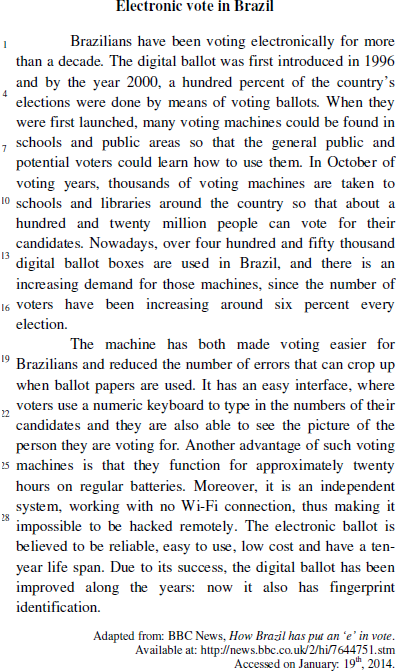
According to the text, choose the correct alternative.
Ano: 2014
Banca:
IADES
Órgão:
TRE-PA
Provas:
IADES - 2014 - TRE-PA - Técnico Judiciário - Operação de Computador
|
IADES - 2014 - TRE-PA - Técnico Judiciário - Programador de Computador |
Q404639
Inglês
Considering the text, it’s correct to say that the electronic ballot
Ano: 2014
Banca:
IADES
Órgão:
TRE-PA
Provas:
IADES - 2014 - TRE-PA - Técnico Judiciário - Operação de Computador
|
IADES - 2014 - TRE-PA - Técnico Judiciário - Programador de Computador |
Q404638
Inglês
Based on the text above, choose the correct alternative.
Ano: 2014
Banca:
CESPE / CEBRASPE
Órgão:
TJ-SE
Prova:
CESPE - 2014 - TJ-SE - Técnico Judiciário - Programação de Sistemas |
Q403777
Inglês

Based on the text, judge the items that follow.
Facebook didn’t pay some of the 687 write-ups.
Facebook didn’t pay some of the 687 write-ups.

 Conheça nossos planos