Questões de Concurso
Sobre interpretação de texto | reading comprehension em inglês
Foram encontradas 12.709 questões


Ano: 2012
Banca:
CESPE / CEBRASPE
Órgão:
ANAC
Provas:
CESPE - 2012 - ANAC - Técnico em Regulação de Aviação Civil - Área 2
|
CESPE - 2012 - ANAC - Técnico em Regulação de Aviação Civil - Conhecimentos Básicos Áreas 1, 3, e 4 |
Q279811
Inglês
Texto associado

Based on the text above, judge the following items.
Based on the text above, judge the following items.
Users are invited to identify and denounce the apps which they find unsatisfying.
Ano: 2012
Banca:
CESPE / CEBRASPE
Órgão:
ANAC
Provas:
CESPE - 2012 - ANAC - Técnico em Regulação de Aviação Civil - Área 2
|
CESPE - 2012 - ANAC - Técnico em Regulação de Aviação Civil - Conhecimentos Básicos Áreas 1, 3, e 4 |
Q279810
Inglês
Texto associado
Based on the text above, judge the following items.
Based on the text above, judge the following items.
The aim of the inquiry mentioned on the text is to identify apps which do not disclose precise information about costs involved in its use.
Ano: 2012
Banca:
CESPE / CEBRASPE
Órgão:
ANAC
Prova:
CESPE - 2012 - ANAC - Técnico em Regulação de Aviação Civil - Área 2 |
Q279809
Inglês
Texto associado
Based on the text above, judge the following items.
Based on the text above, judge the following items.
The inquiry was motivated by a generalized feeling that consumers’ rights are being infringed on.
Ano: 2012
Banca:
CESPE / CEBRASPE
Órgão:
ANAC
Prova:
CESPE - 2012 - ANAC - Técnico em Regulação de Aviação Civil - Área 2 |
Q279808
Inglês
Texto associado
Based on the text above, judge the following items.
Based on the text above, judge the following items.
The Assistant Treasurer considers worrying the way children, in particular, are led to spend money on products.
Ano: 2012
Banca:
CESPE / CEBRASPE
Órgão:
ANAC
Prova:
CESPE - 2012 - ANAC - Técnico em Regulação de Aviação Civil - Área 2 |
Q279807
Inglês
Texto associado
Based on the text above, judge the following items.
Based on the text above, judge the following items.
The ease with which purchases can be made on mobile devices is mentioned as a specific concern.
Ano: 2012
Banca:
CESPE / CEBRASPE
Órgão:
ANAC
Prova:
CESPE - 2012 - ANAC - Técnico em Regulação de Aviação Civil - Área 2 |
Q279806
Inglês
Texto associado
Based on the text above, judge the following items.
Based on the text above, judge the following items.
The inquiry was motivated by the sudden change in the way shoppers shop.
Ano: 2012
Banca:
CESPE / CEBRASPE
Órgão:
ANAC
Provas:
CESPE - 2012 - ANAC - Técnico em Regulação de Aviação Civil - Área 2
|
CESPE - 2012 - ANAC - Técnico em Regulação de Aviação Civil - Conhecimentos Básicos Áreas 1, 3, e 4 |
Q279805
Inglês
Texto associado

Based on the text above, judge the following items.
Based on the text above, judge the following items.
According to the text, it has been proved that medical investigation may find cancer even if the patient has no symptoms of the disease.
Ano: 2012
Banca:
CESPE / CEBRASPE
Órgão:
ANAC
Provas:
CESPE - 2012 - ANAC - Técnico em Regulação de Aviação Civil - Área 2
|
CESPE - 2012 - ANAC - Técnico em Regulação de Aviação Civil - Conhecimentos Básicos Áreas 1, 3, e 4 |
Q279804
Inglês
Texto associado
Based on the text above, judge the following items.
Based on the text above, judge the following items.
Not all doctors believe there is no link between trauma and cancer.
Ano: 2012
Banca:
CESPE / CEBRASPE
Órgão:
ANAC
Provas:
CESPE - 2012 - ANAC - Técnico em Regulação de Aviação Civil - Área 2
|
CESPE - 2012 - ANAC - Técnico em Regulação de Aviação Civil - Conhecimentos Básicos Áreas 1, 3, e 4 |
Q279803
Inglês
Texto associado
Based on the text above, judge the following items.
Based on the text above, judge the following items.
In the past some doctors believed that injuries caused cancer because this is what animal experiments indicated.
Ano: 2012
Banca:
CESPE / CEBRASPE
Órgão:
ANAC
Prova:
CESPE - 2012 - ANAC - Técnico em Regulação de Aviação Civil - Área 2 |
Q279802
Inglês
Texto associado
Based on the text above, judge the following items.
Based on the text above, judge the following items.
The study which was subject to criticism has not been replicated.
Ano: 2012
Banca:
CESPE / CEBRASPE
Órgão:
ANAC
Prova:
CESPE - 2012 - ANAC - Especialista em Regulação de Aviação Civil - Área 5 |
Q279396
Inglês

Based on the text above, judge the following items.
Our facial response to people from different status at work seems to be unconscious.
Our facial response to people from different status at work seems to be unconscious.
Ano: 2012
Banca:
CESPE / CEBRASPE
Órgão:
ANAC
Prova:
CESPE - 2012 - ANAC - Especialista em Regulação de Aviação Civil - Área 5 |
Q279395
Inglês
Based on the text above, judge the following items.
The research may help employees to become aware of what their bodies are signaling in certain situations.
The research may help employees to become aware of what their bodies are signaling in certain situations.
Ano: 2012
Banca:
CESPE / CEBRASPE
Órgão:
ANAC
Prova:
CESPE - 2012 - ANAC - Especialista em Regulação de Aviação Civil - Área 5 |
Q279394
Inglês
Based on the text above, judge the following items.
From the researchers’ point of view, the smile from a hierarchically superior person is a sign of prejudice, since it is not sincere.
From the researchers’ point of view, the smile from a hierarchically superior person is a sign of prejudice, since it is not sincere.
Ano: 2012
Banca:
CESPE / CEBRASPE
Órgão:
ANAC
Prova:
CESPE - 2012 - ANAC - Especialista em Regulação de Aviação Civil - Área 5 |
Q279393
Inglês
Based on the text above, judge the following items.
The UCSD research indicates that mimicking is a contributing factor to the strengthening of relationships.
The UCSD research indicates that mimicking is a contributing factor to the strengthening of relationships.
Ano: 2012
Banca:
CESPE / CEBRASPE
Órgão:
ANAC
Prova:
CESPE - 2012 - ANAC - Especialista em Regulação de Aviação Civil - Área 5 |
Q279392
Inglês
Based on the text above, judge the following items.
Evan Carr and Carol Goman are two of the researchers involved in the UCSD study.
Evan Carr and Carol Goman are two of the researchers involved in the UCSD study.
Ano: 2012
Banca:
CESPE / CEBRASPE
Órgão:
ANAC
Provas:
CESPE - 2012 - ANAC - Especialista em Regulação de Aviação Civil - Área 5
|
CESPE - 2012 - ANAC - Especialista em Regulação de Aviação Civil - Conhecimentos Básicos |
Q279387
Inglês
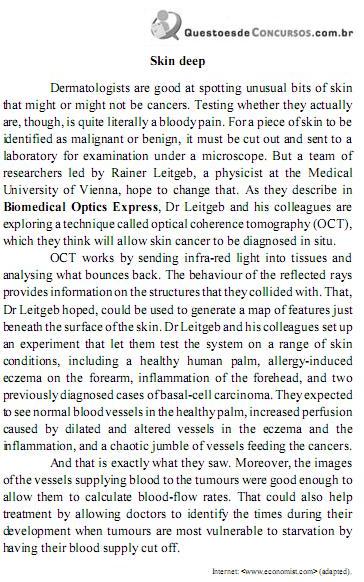
Based on the text above, judge the items from .
What is revolutionary about the research is that it indicates that skin cancer may be diagnosed without the need of cutting out a piece of skin to be examined in a lab.
What is revolutionary about the research is that it indicates that skin cancer may be diagnosed without the need of cutting out a piece of skin to be examined in a lab.
Ano: 2012
Banca:
CESGRANRIO
Órgão:
DECEA
Prova:
CESGRANRIO - 2012 - DECEA - Controlador de Tráfego Aéreo Código |
Q277978
Inglês

A comparison between Texts I and II reveals that
Ano: 2012
Banca:
CESGRANRIO
Órgão:
DECEA
Prova:
CESGRANRIO - 2012 - DECEA - Controlador de Tráfego Aéreo Código |
Q277975
Inglês
The fragment of Text II “but it might be a tough sell politically.” (lines 70-71) implies that it would be
Ano: 2012
Banca:
CESGRANRIO
Órgão:
DECEA
Prova:
CESGRANRIO - 2012 - DECEA - Controlador de Tráfego Aéreo Código |
Q277974
Inglês
In Text II, according to Philip Gerhman,
Ano: 2012
Banca:
CESGRANRIO
Órgão:
DECEA
Prova:
CESGRANRIO - 2012 - DECEA - Controlador de Tráfego Aéreo Código |
Q277969
Inglês

Based on Text I, lack of adequate amount of sleep is NOT responsible for

 Conheça nossos planos